<?xml version="1.0" encoding="utf-8"?><feed xmlns="http://www.w3.org/2005/Atom" xml:lang="en"><generator uri="https://jekyllrb.com/" version="3.10.0">Jekyll</generator><link href="https://dentiny.github.io/feed.xml" rel="self" type="application/atom+xml" /><link href="https://dentiny.github.io/" rel="alternate" type="text/html" hreflang="en" /><updated>2026-10-12T19:01:09-07:00</updated><id>https://dentiny.github.io/feed.xml</id><title type="html">dentiny</title><subtitle>Notes, ideas, and things I learn.</subtitle><author><name>dentiny</name></author><entry><title type="html">My DuckDB extensions: caching, storage, and everything around remote data</title><link href="https://dentiny.github.io/posts/duckdb-extensions/" rel="alternate" type="text/html" title="My DuckDB extensions: caching, storage, and everything around remote data" /><published>2026-10-09T00:00:00-07:00</published><updated>2026-10-09T00:00:00-07:00</updated><id>https://dentiny.github.io/posts/duckdb-extensions</id><content type="html" xml:base="https://dentiny.github.io/posts/duckdb-extensions/"><![CDATA[<p>DuckDB is fast on a laptop SSD. Point it at S3 and you’re dealing with round trips, tail latency, throttling and egress bills instead.</p>

<p>In November 2024, a DuckDB user opened <a href="https://github.com/duckdb/duckdb-httpfs/issues/4">an issue on <code class="language-plaintext highlighter-rouge">httpfs</code></a> asking for a disk cache: querying S3 from a laptop was slow, and every query paid for egress again. That issue is still open. Four months later I shipped <code class="language-plaintext highlighter-rouge">cache_httpfs</code> as a community extension. In the latest published rolling week, it was downloaded 56,068 times, sixth among 356 community extensions with reported downloads (<a href="https://community-extensions.duckdb.org/downloads-last-week.json">snapshot updated October 12, 2026, 04:00 UTC</a>).</p>

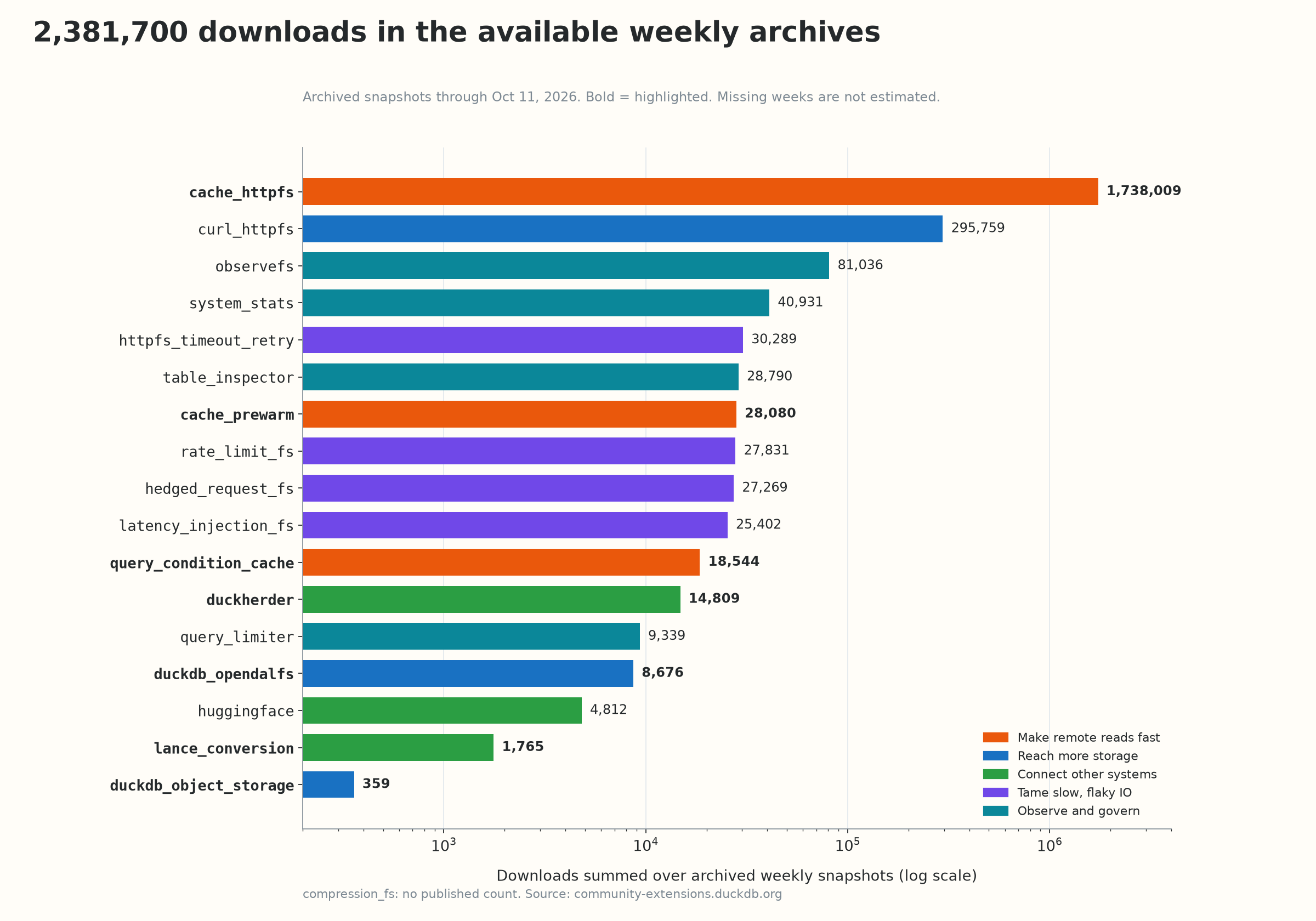
<p>That’s the pattern behind everything in this post. Since March 2025, my collaborators and I have shipped 18 DuckDB extensions, with more than 2.3 million downloads recorded in the available weekly archives. Here’s the short version.</p>

<p><strong>TL;DR</strong></p>

<ul>
  <li><strong>Small extensions that compose.</strong> Each one fixes a single problem, so you load only what you need.</li>
  <li><strong>Seven highlights:</strong>
    <ul>
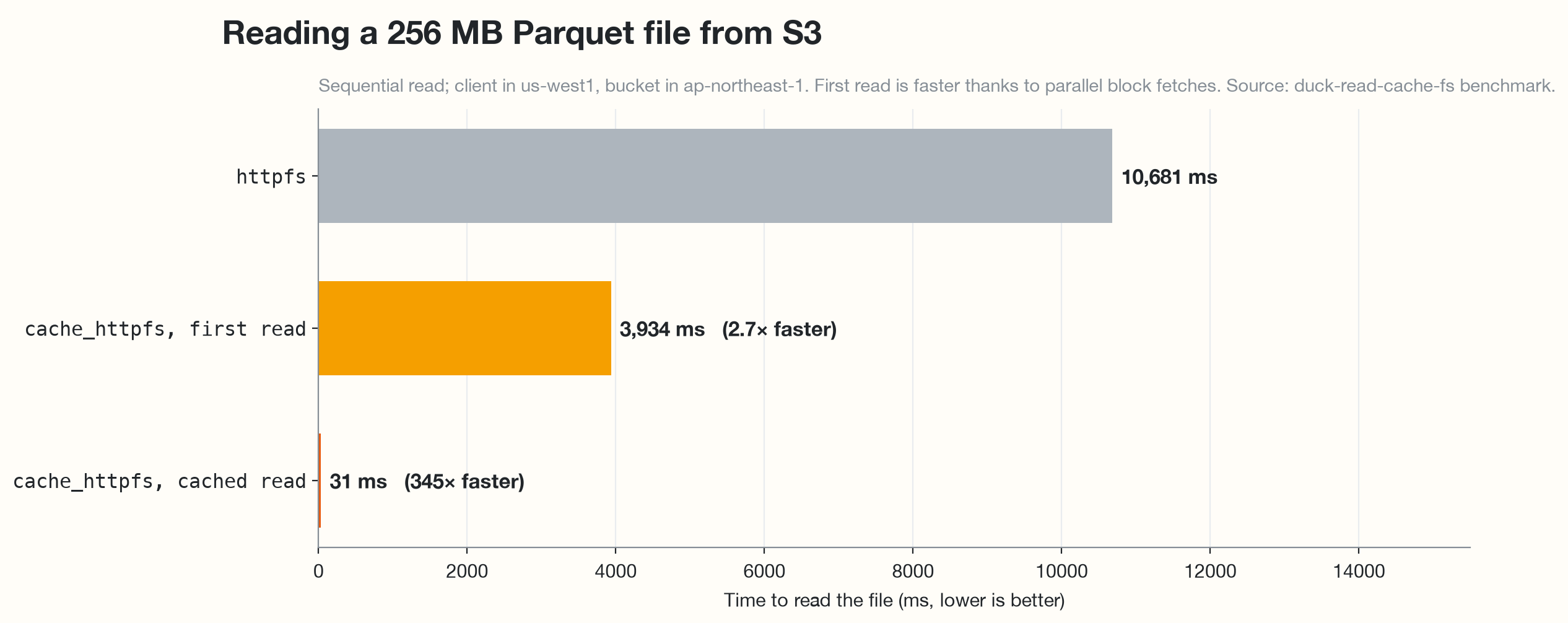
      <li><a href="#cache-httpfs"><code class="language-plaintext highlighter-rouge">cache_httpfs</code></a>: a persistent cache that reads S3 data up to 345× faster</li>
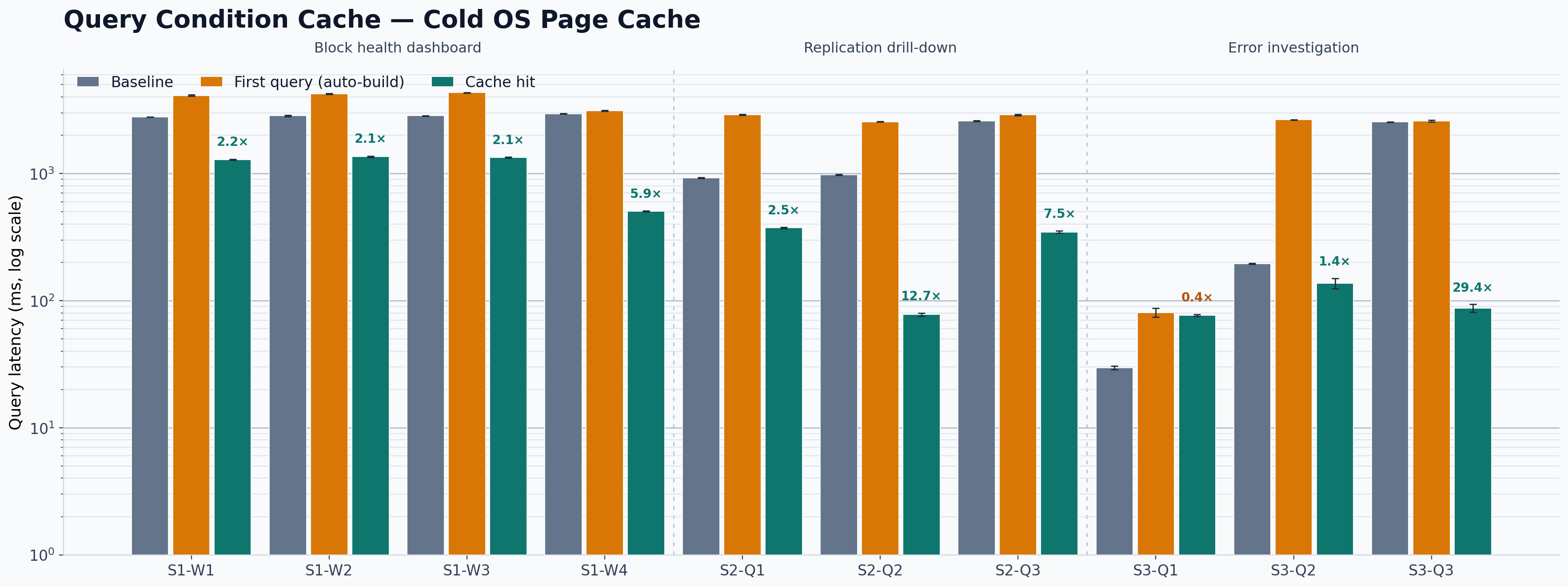
      <li><a href="#query-condition-cache"><code class="language-plaintext highlighter-rouge">query_condition_cache</code></a>: a predicate cache that runs repeated queries up to 29× faster</li>
      <li><a href="#cache-prewarm"><code class="language-plaintext highlighter-rouge">cache_prewarm</code></a>: warms data before the first query</li>
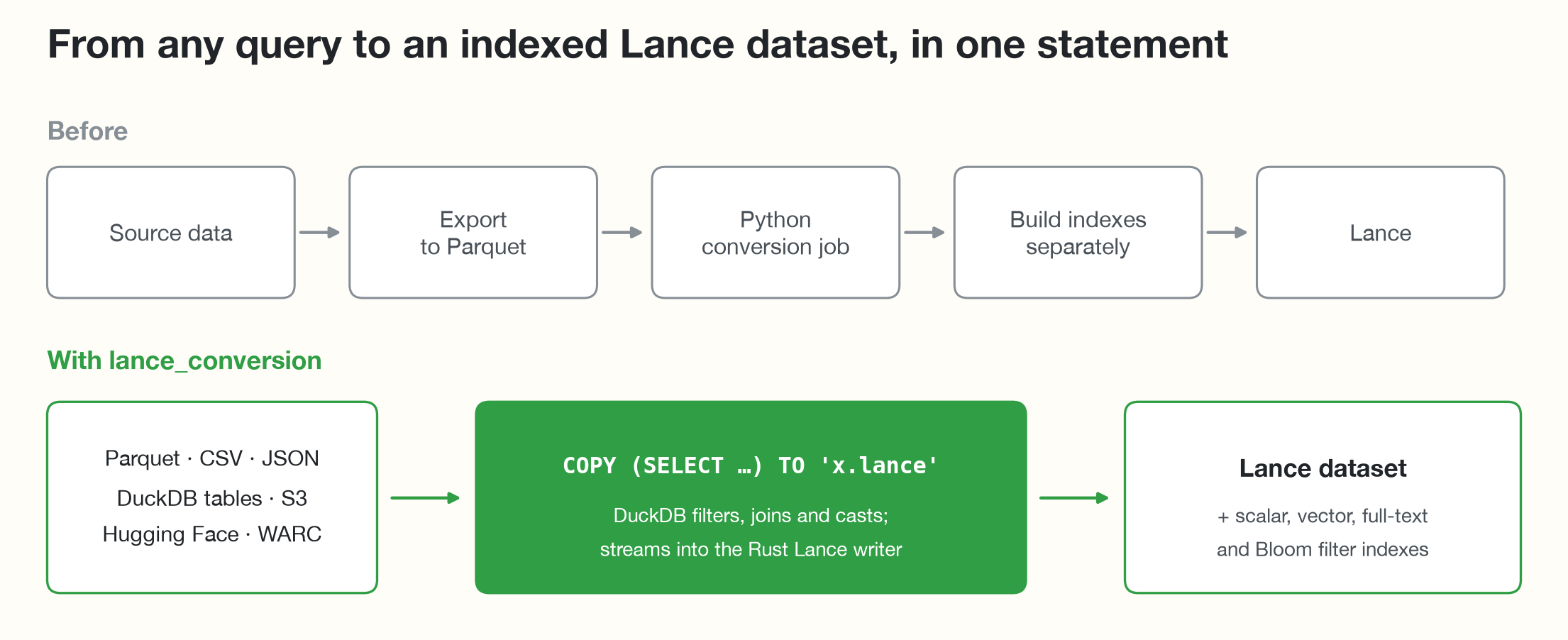
      <li><a href="#lance-conversion"><code class="language-plaintext highlighter-rouge">lance_conversion</code></a>: turns any query into an indexed Lance dataset in one statement</li>
      <li><a href="#duckherder"><code class="language-plaintext highlighter-rouge">duckherder</code></a>: runs your SQL on remote servers</li>
      <li><a href="#duckdb-object-storage"><code class="language-plaintext highlighter-rouge">duckdb_object_storage</code></a>: a writable DuckDB database on S3, with any number of read-only readers</li>
      <li><a href="#duckdb-opendalfs"><code class="language-plaintext highlighter-rouge">duckdb_opendalfs</code></a>: one extension for many storage backends</li>
    </ul>
  </li>
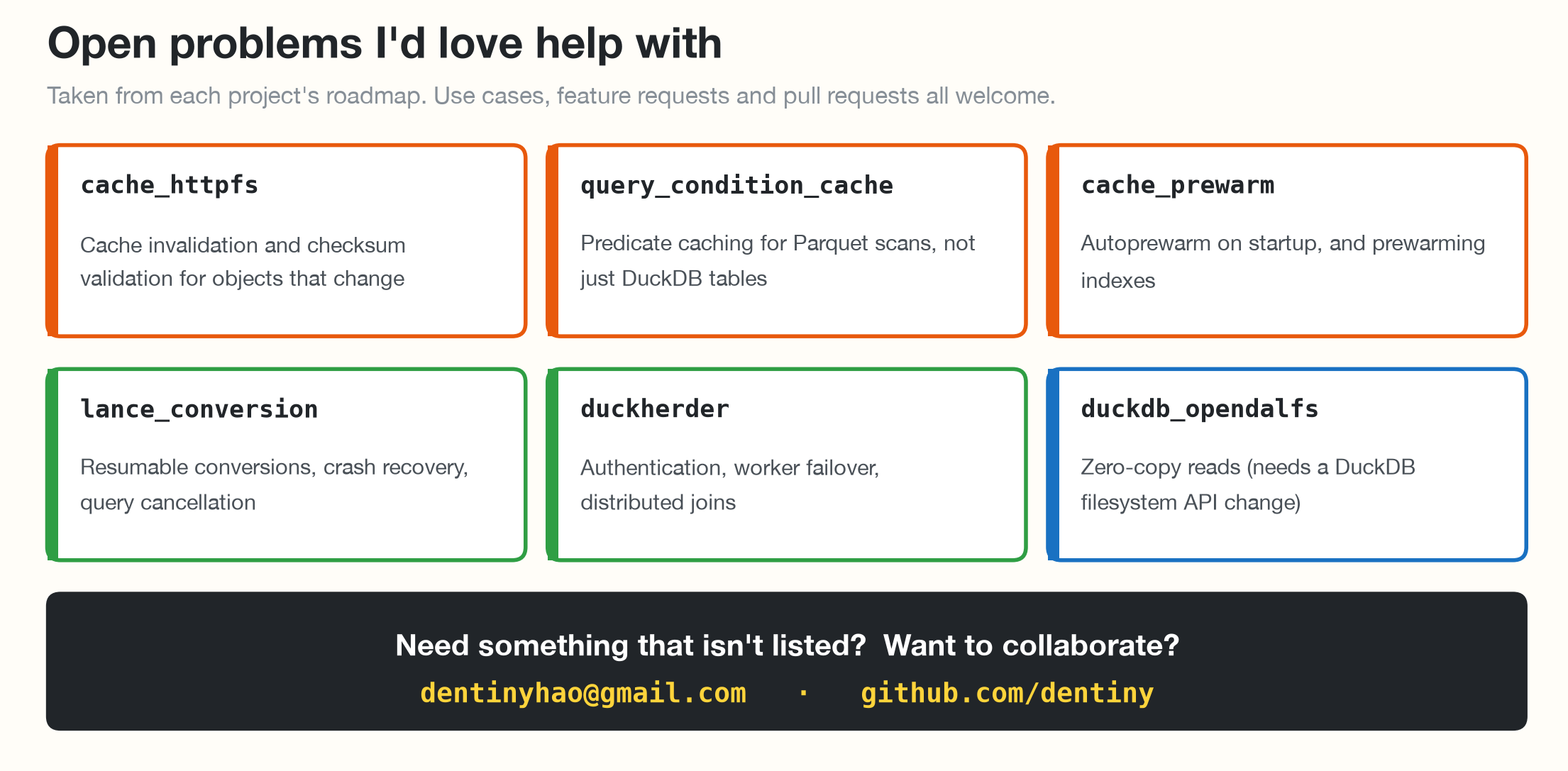
  <li><strong>I’m looking for feature requests and collaborations.</strong> See <a href="#lets-build-together">open problems</a>, or email me at <a href="mailto:dentinyhao@gmail.com">dentinyhao@gmail.com</a>.</li>
</ul>

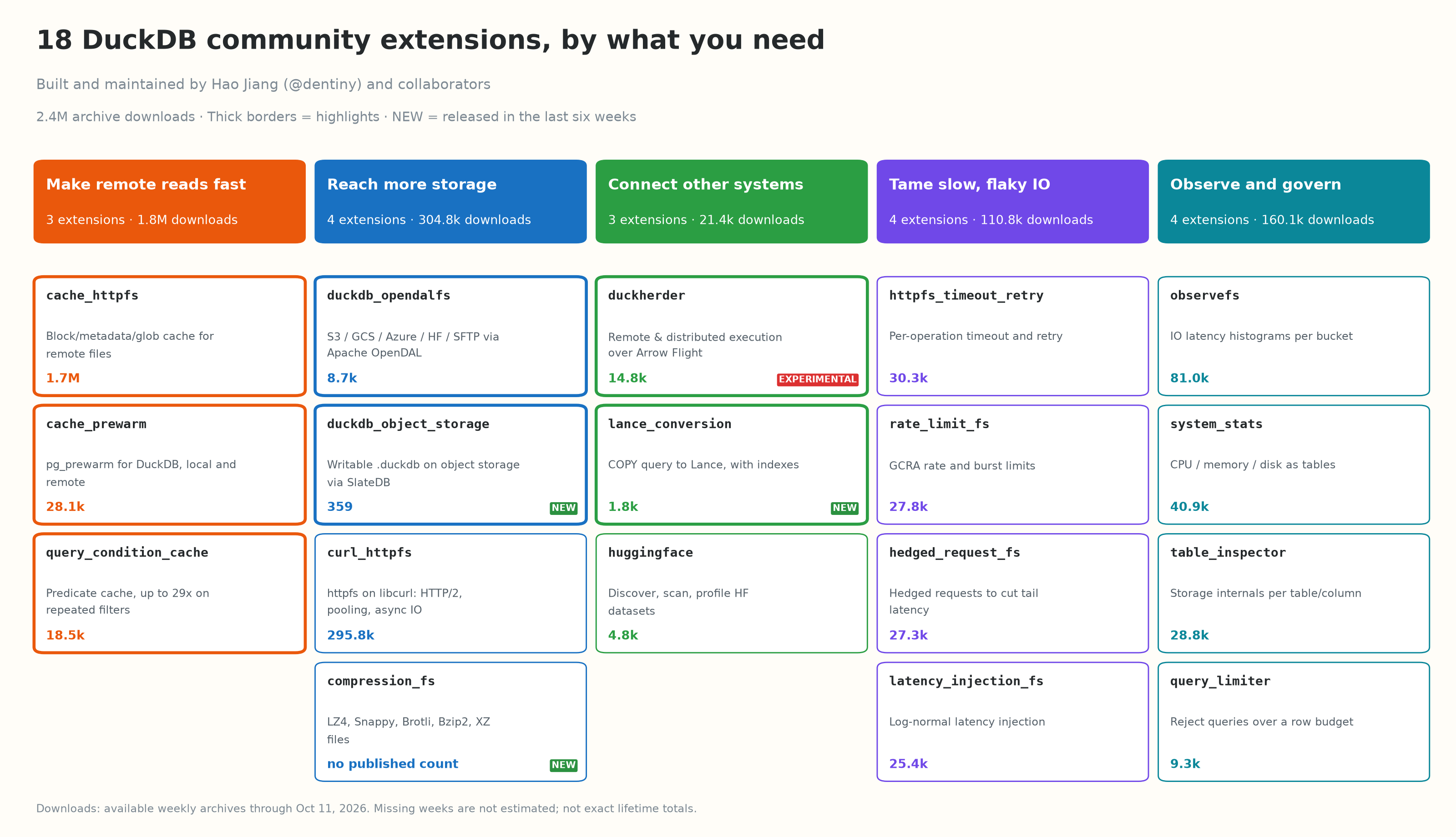
<p><img src="/assets/images/duckdb-extensions/extension-map.png" alt="18 DuckDB community extensions grouped by what you need, with highlights and maturity badges" /></p>

<hr />

<h2 id="what-a-duckdb-extension-is">What a DuckDB extension is</h2>

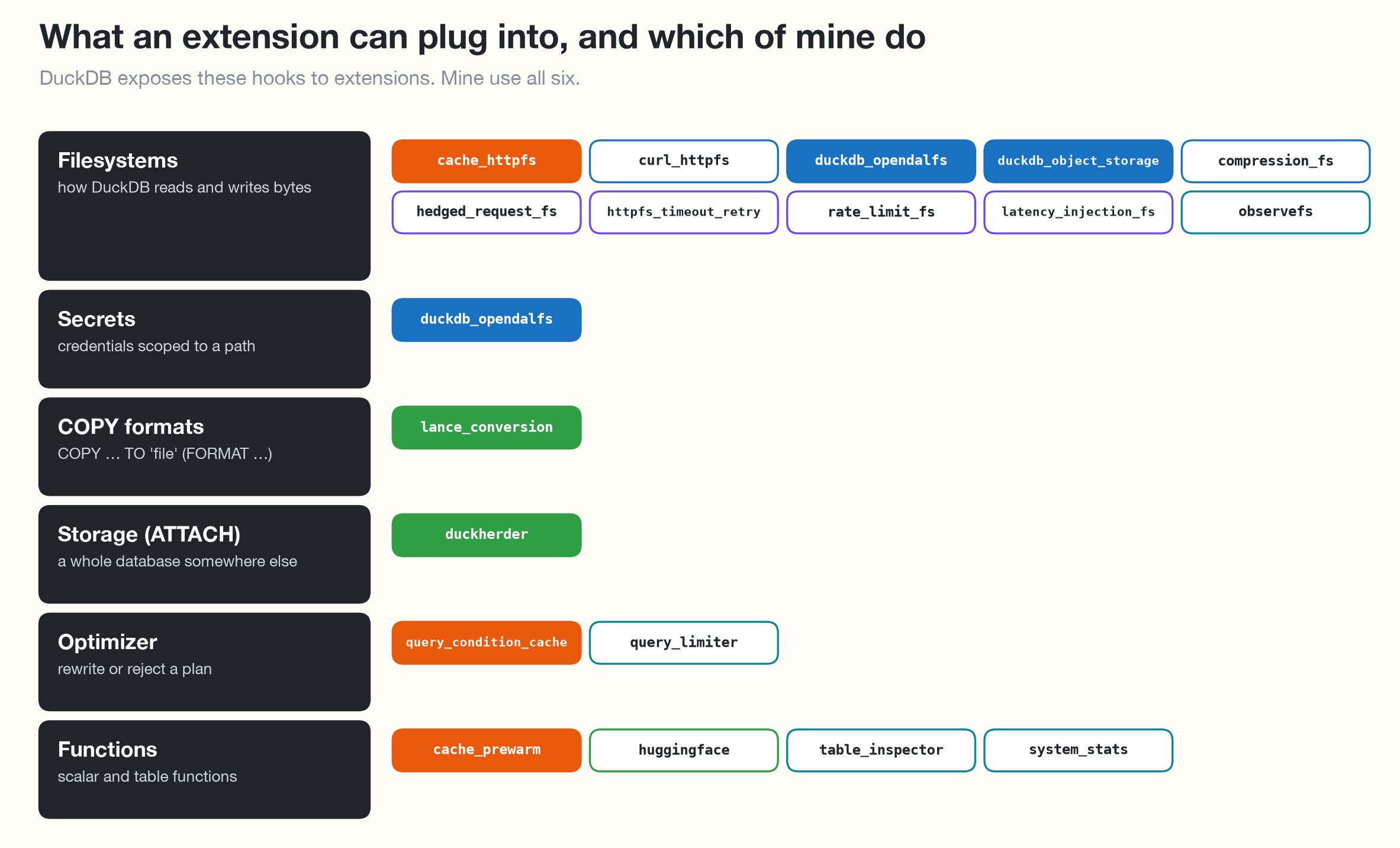
<p>An extension is native code that DuckDB loads into its own process with <code class="language-plaintext highlighter-rouge">INSTALL</code> and <code class="language-plaintext highlighter-rouge">LOAD</code>. Once loaded, it runs as part of the engine: no separate service, no network hop, no fork of DuckDB. And extensions can do far more than add functions. DuckDB lets them plug in at several levels, from how bytes are read to how a query is planned.</p>

<p><img src="/assets/images/duckdb-extensions/extension-hooks.png" alt="The hooks DuckDB exposes to extensions, and which of my extensions use each one" /></p>

<p>Community extensions are built, signed and distributed by DuckDB for every platform, from a short descriptor in <a href="https://github.com/duckdb/community-extensions"><code class="language-plaintext highlighter-rouge">duckdb/community-extensions</code></a>. Anyone can install one with <code class="language-plaintext highlighter-rouge">INSTALL cache_httpfs FROM community;</code>, with no custom repository and no unsigned flag.</p>

<h2 id="how-i-build-them">How I build them</h2>

<p><strong>One extension, one capability.</strong> Caching, timeouts, rate limits and hedged requests are four extensions, not four settings in one big one. You can adopt, debug and remove each one on its own.</p>

<p><strong>Minimal setup, works out of the box.</strong> <code class="language-plaintext highlighter-rouge">INSTALL</code> and <code class="language-plaintext highlighter-rouge">LOAD</code>, plus at most a few settings or function calls, should be all you need. Defaults are chosen for the common case: <code class="language-plaintext highlighter-rouge">LOAD cache_httpfs</code> alone caches every S3 read on local disk. Tuning knobs exist, but you only touch them when you want to.</p>

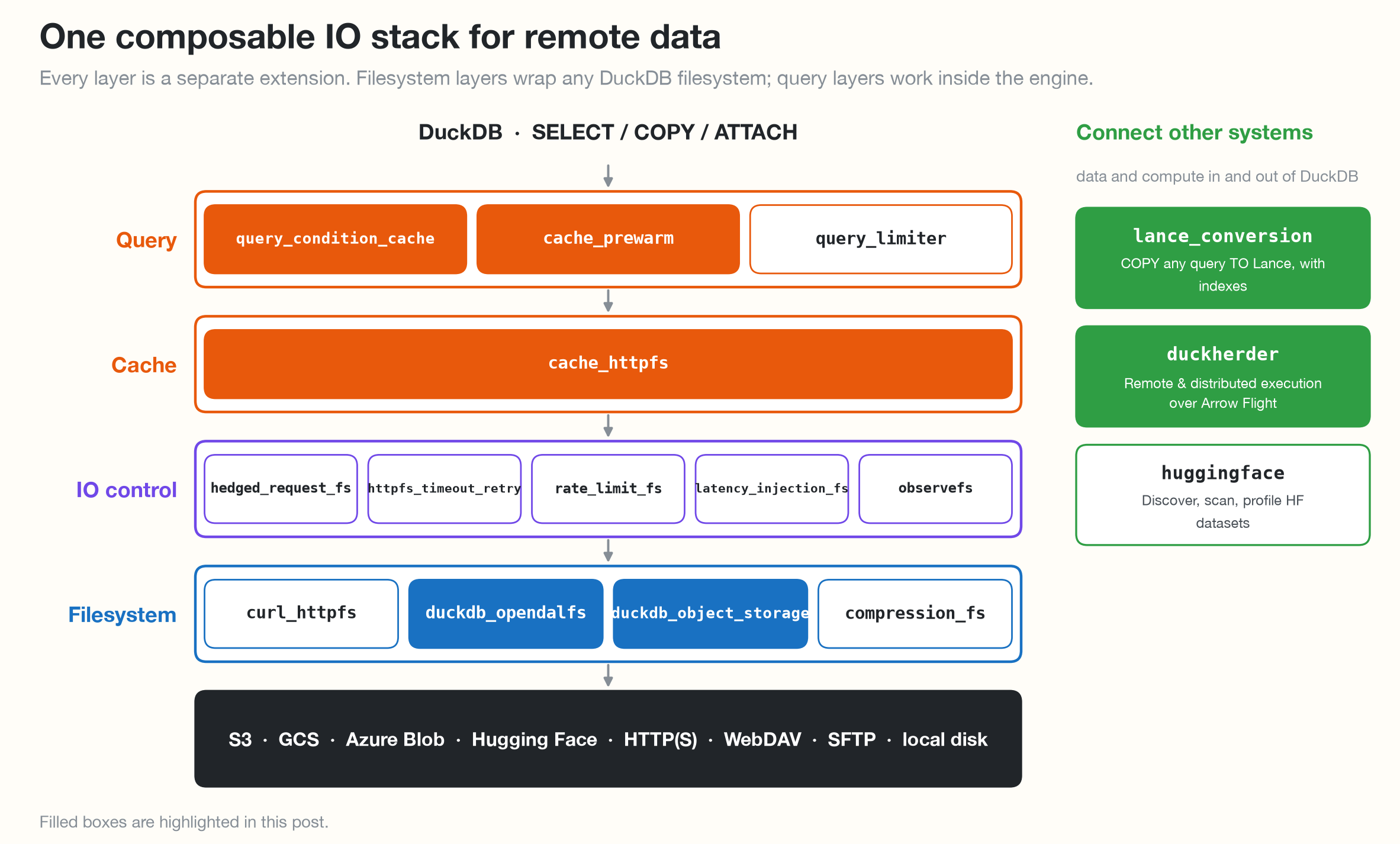
<p><strong>Everything composes.</strong> Each filesystem extension wraps any registered DuckDB filesystem, including ones I didn’t write, so they stack. Here is a GCS bucket cached on local disk:</p>

<div class="language-sql highlighter-rouge"><div class="highlight"><pre class="highlight"><code><span class="k">LOAD</span> <span class="n">duckdb_opendalfs</span><span class="p">;</span>   <span class="c1">-- reach GCS, Azure, Hugging Face, SFTP, ...</span>
<span class="k">LOAD</span> <span class="n">cache_httpfs</span><span class="p">;</span>       <span class="c1">-- cache blocks, metadata and globs on local disk</span>
<span class="k">CALL</span> <span class="n">cache_httpfs_wrap_cache_filesystem</span><span class="p">(</span><span class="s1">'duckdb_opendalfs'</span><span class="p">);</span>
</code></pre></div></div>

<p><img src="/assets/images/duckdb-extensions/storage-stack.png" alt="The extensions arranged as a layered IO stack" /></p>

<p><strong>Stay focused.</strong> Almost everything I build is about storage, caching, or getting data in and out of DuckDB. The resilience and observability extensions exist to make those three dependable in production.</p>

<h2 id="why-i-build-them">Why I build them</h2>

<p>Two kinds of problems get my attention.</p>

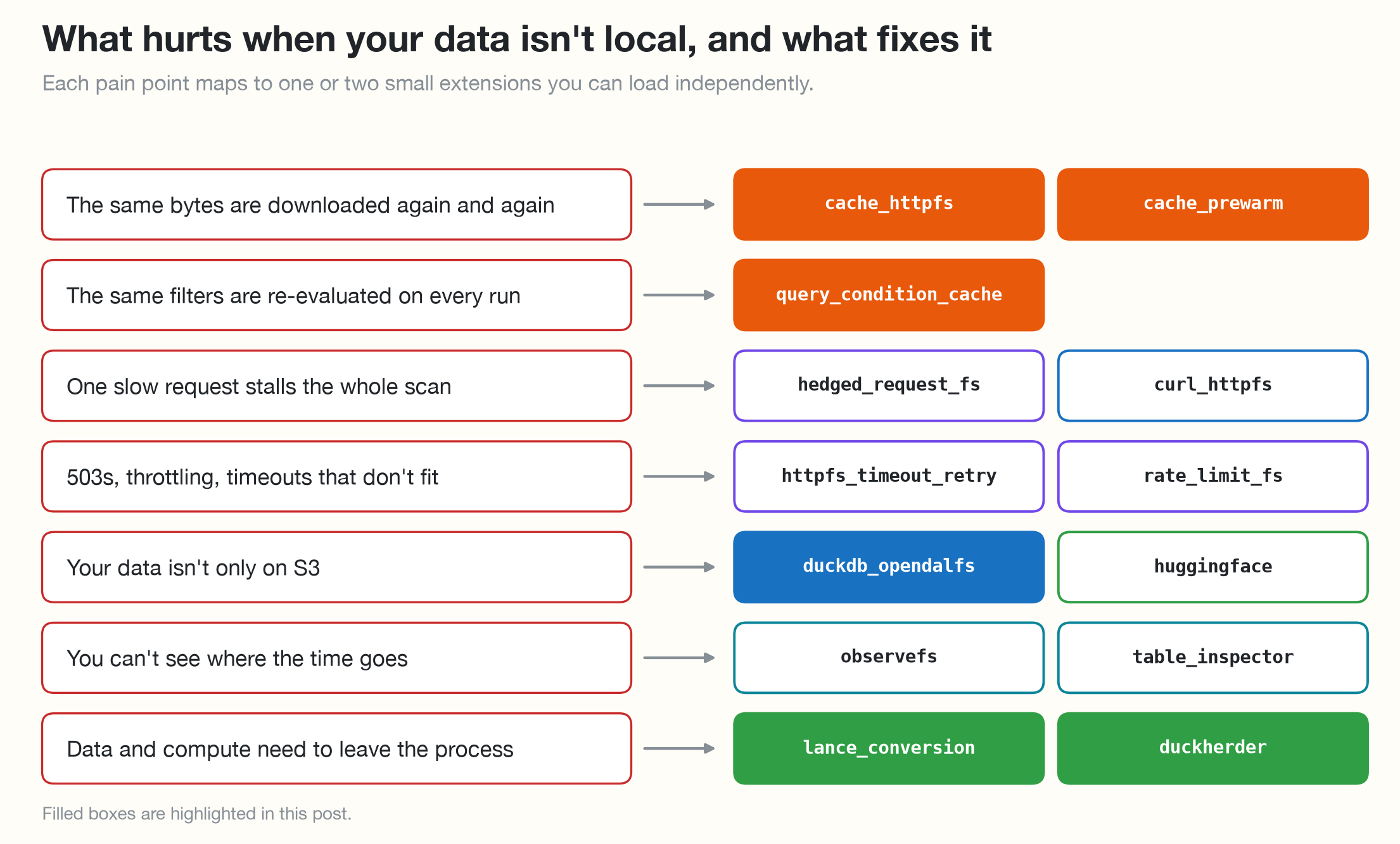
<p><strong>Pain points users already feel</strong>, like the disk cache request above:</p>

<p><img src="/assets/images/duckdb-extensions/pain-to-fix.png" alt="Pain points of remote data mapped to the extensions that fix them" /></p>

<p><strong>Extending DuckDB’s reach to other systems.</strong> These rely on libraries that don’t belong in DuckDB’s core, so they live as extensions:</p>

<ul>
  <li><code class="language-plaintext highlighter-rouge">duckdb_opendalfs</code>: GCS, Azure Blob, Hugging Face, WebDAV, SFTP and more, through Apache OpenDAL</li>
  <li><code class="language-plaintext highlighter-rouge">compression_fs</code>: LZ4, Snappy, Brotli, Bzip2 and XZ files</li>
  <li><code class="language-plaintext highlighter-rouge">lance_conversion</code>: Lance datasets</li>
  <li><code class="language-plaintext highlighter-rouge">duckdb_object_storage</code>: databases stored in SlateDB</li>
  <li><code class="language-plaintext highlighter-rouge">huggingface</code>: datasets on the Hugging Face Hub</li>
  <li><code class="language-plaintext highlighter-rouge">duckherder</code>: other DuckDB servers, over Arrow Flight</li>
</ul>

<hr />

<h2 id="highlights">Highlights</h2>

<p>Each highlight follows the same pattern: what it fixes, a picture, the SQL to try it, and where it fits.</p>

<h3 id="cache-httpfs"><a href="https://github.com/dentiny/duck-read-cache-fs"><code class="language-plaintext highlighter-rouge">cache_httpfs</code></a>: a persistent read cache for remote files</h3>

<p>DuckDB’s built-in file cache lives in memory and disappears when the process exits. <code class="language-plaintext highlighter-rouge">cache_httpfs</code> is a drop-in replacement for <code class="language-plaintext highlighter-rouge">httpfs</code> that keeps <strong>data blocks, metadata, file handles and glob results</strong> on local disk, and fetches large reads in parallel. With more than 1.7 million downloads recorded in the available weekly archives, it has been in the community top 10 every archived week since March 2026.</p>

<p><img src="/assets/images/duckdb-extensions/cache-httpfs-benchmark.png" alt="cache_httpfs benchmark: 10,681 ms with httpfs, 3,934 ms on first read, 31 ms cached" /></p>

<div class="language-sql highlighter-rouge"><div class="highlight"><pre class="highlight"><code><span class="n">INSTALL</span> <span class="n">cache_httpfs</span> <span class="k">FROM</span> <span class="n">community</span><span class="p">;</span>
<span class="k">LOAD</span> <span class="n">cache_httpfs</span><span class="p">;</span>   <span class="c1">-- loads httpfs for you; on-disk cache is the default</span>

<span class="k">SELECT</span> <span class="k">count</span><span class="p">(</span><span class="o">*</span><span class="p">)</span> <span class="k">FROM</span> <span class="s1">'s3://my-bucket/events/*.parquet'</span><span class="p">;</span>   <span class="c1">-- cold: fetched from S3</span>
<span class="k">SELECT</span> <span class="k">count</span><span class="p">(</span><span class="o">*</span><span class="p">)</span> <span class="k">FROM</span> <span class="s1">'s3://my-bucket/events/*.parquet'</span><span class="p">;</span>   <span class="c1">-- warm: read from local disk</span>
</code></pre></div></div>

<p><strong>Best for</strong> dashboards, notebooks and CI jobs that read the same remote files again and again. <strong>Not for</strong> tiny random reads, which pay for block alignment; lower <code class="language-plaintext highlighter-rouge">cache_httpfs_cache_block_size</code> if that’s your workload.</p>

<h3 id="query-condition-cache"><a href="https://github.com/dentiny/duckdb-query-condition-cache"><code class="language-plaintext highlighter-rouge">query_condition_cache</code></a>: a predicate cache</h3>

<p>Dashboards and log investigations run the same <code class="language-plaintext highlighter-rouge">WHERE</code> clauses all day. Zone maps rarely help with <code class="language-plaintext highlighter-rouge">LIKE</code> patterns or unsorted columns, so DuckDB scans again on every run. This extension remembers <strong>which vectors matched a predicate</strong> and skips the rest next time, following the SIGMOD ‘24 paper <a href="https://dl.acm.org/doi/10.1145/3626246.3653395"><em>Predicate Caching</em></a> and <a href="https://clickhouse.com/blog/introducing-the-clickhouse-query-condition-cache">ClickHouse’s query condition cache</a>. On <a href="https://github.com/logpai/loghub/tree/master/HDFS">HDFS logs</a> (58 million records), cache hits were <strong>up to 29× faster</strong> with a cold OS page cache and up to 14× with warm storage; <a href="https://andrewtangtang.github.io/writing/query-condition-cache/">Andrew’s write-up</a> has the design and full results.</p>

<p><img src="/assets/images/duckdb-extensions/qcc-hdfs-benchmark.png" alt="Query condition cache on HDFS logs with a cold OS page cache: baseline, first query and cache hit across ten queries" /></p>

<div class="language-sql highlighter-rouge"><div class="highlight"><pre class="highlight"><code><span class="n">INSTALL</span> <span class="n">query_condition_cache</span> <span class="k">FROM</span> <span class="n">community</span><span class="p">;</span>
<span class="k">LOAD</span> <span class="n">query_condition_cache</span><span class="p">;</span>

<span class="c1">-- Built on the first run, used on later runs.</span>
<span class="k">SELECT</span> <span class="k">count</span><span class="p">(</span><span class="o">*</span><span class="p">)</span> <span class="k">FROM</span> <span class="n">logs</span> <span class="k">WHERE</span> <span class="k">level</span> <span class="o">=</span> <span class="s1">'ERROR'</span> <span class="k">AND</span> <span class="n">msg</span> <span class="k">LIKE</span> <span class="s1">'%timeout%'</span><span class="p">;</span>
</code></pre></div></div>

<p><strong>Best for</strong> selective filters that repeat over native DuckDB tables. <strong>Not for</strong> one-off queries, since the first run pays for an extra scan to build the entry, or broad filters with little to skip. Parquet scans are on the roadmap.</p>

<h3 id="cache-prewarm"><a href="https://github.com/dentiny/duckdb-cache-prewarm"><code class="language-plaintext highlighter-rouge">cache_prewarm</code></a>: <code class="language-plaintext highlighter-rouge">pg_prewarm</code> for DuckDB</h3>

<p>The first query after a restart shouldn’t be the slow one. Modeled on PostgreSQL’s <code class="language-plaintext highlighter-rouge">pg_prewarm</code>, this loads data before users arrive: into DuckDB’s buffer pool, into the OS page cache, or, with <code class="language-plaintext highlighter-rouge">cache_httpfs</code>, from S3 to local disk.</p>

<p><img src="/assets/images/duckdb-extensions/cache-prewarm-flow.png" alt="cache_prewarm: after a restart, prewarm loads data into the buffer pool, page cache or local disk so the first query is served warm" /></p>

<div class="language-sql highlighter-rouge"><div class="highlight"><pre class="highlight"><code><span class="n">INSTALL</span> <span class="n">cache_prewarm</span> <span class="k">FROM</span> <span class="n">community</span><span class="p">;</span>
<span class="k">LOAD</span> <span class="n">cache_prewarm</span><span class="p">;</span>

<span class="k">SELECT</span> <span class="n">prewarm</span><span class="p">(</span><span class="s1">'events'</span><span class="p">);</span>                              <span class="c1">-- buffer pool</span>
<span class="k">SELECT</span> <span class="n">prewarm</span><span class="p">(</span><span class="s1">'events'</span><span class="p">,</span> <span class="s1">'read'</span><span class="p">,</span> <span class="s1">'4GB'</span><span class="p">);</span>               <span class="c1">-- OS page cache, capped at 4 GB</span>
<span class="k">SELECT</span> <span class="n">prewarm_remote</span><span class="p">(</span><span class="s1">'s3://lake/events/*.parquet'</span><span class="p">);</span>   <span class="c1">-- remote files, via cache_httpfs</span>
</code></pre></div></div>

<p><strong>Best for</strong> long-running services and dashboards that restart and need a fast first query. <strong>Not for</strong> data much larger than memory: prewarming stops at 80% of the free buffer pool, so raise <code class="language-plaintext highlighter-rouge">memory_limit</code> or prewarm only the hot tables.</p>

<h3 id="lance-conversion"><a href="https://github.com/dentiny/duckdb_lance_conversion"><code class="language-plaintext highlighter-rouge">lance_conversion</code></a>: <code class="language-plaintext highlighter-rouge">COPY</code> any query to Lance</h3>

<p>Getting data into <a href="https://lancedb.github.io/lance/">Lance</a> usually means exporting files and running a separate conversion job. This extension makes it one <code class="language-plaintext highlighter-rouge">COPY</code> statement, with indexes built along the way. Released in September 2026, it recorded 684 downloads in the latest published rolling week.</p>

<p><img src="/assets/images/duckdb-extensions/lance-pipeline.png" alt="Before: four steps to get data into Lance. With lance_conversion: one COPY statement" /></p>

<div class="language-sql highlighter-rouge"><div class="highlight"><pre class="highlight"><code><span class="n">INSTALL</span> <span class="n">lance_conversion</span> <span class="k">FROM</span> <span class="n">community</span><span class="p">;</span>
<span class="k">LOAD</span> <span class="n">lance_conversion</span><span class="p">;</span>

<span class="k">COPY</span> <span class="p">(</span>
  <span class="k">SELECT</span> <span class="n">id</span><span class="p">,</span> <span class="n">category</span><span class="p">,</span> <span class="n">description</span><span class="p">,</span> <span class="n">embedding</span><span class="p">,</span> <span class="n">asset_uri</span>
  <span class="k">FROM</span> <span class="n">read_parquet</span><span class="p">(</span><span class="s1">'s3://lake/catalog/**/*.parquet'</span><span class="p">)</span>
<span class="p">)</span> <span class="k">TO</span> <span class="s1">'s3://lake/catalog.lance'</span> <span class="p">(</span>
  <span class="n">FORMAT</span> <span class="n">LANCE</span><span class="p">,</span>
  <span class="n">PRESERVE_ORDER</span> <span class="k">false</span><span class="p">,</span>                  <span class="c1">-- one writer per DuckDB thread</span>
  <span class="n">BLOB_COLUMNS</span> <span class="p">(</span><span class="n">asset_uri</span><span class="p">),</span>
  <span class="n">SCALAR_INDEX_COLUMNS</span> <span class="p">(</span><span class="n">id</span><span class="p">,</span> <span class="n">category</span><span class="p">),</span>
  <span class="n">VECTOR_INDEX_COLUMNS</span> <span class="p">(</span><span class="n">embedding</span><span class="p">),</span>
  <span class="n">TEXT_INDEX_COLUMNS</span> <span class="p">(</span><span class="n">description</span><span class="p">)</span>
<span class="p">);</span>
</code></pre></div></div>

<p><strong>Best for</strong> turning Parquet, JSON, Hugging Face datasets or WARC archives into indexed Lance datasets for search and ML. It also supports append, overwrite and random sampling. <strong>Not for</strong> Windows x64, Intel Macs or the browser yet; those builds are excluded.</p>

<h3 id="duckherder"><a href="https://github.com/dentiny/duckdb-distributed-execution"><code class="language-plaintext highlighter-rouge">duckherder</code></a>: remote and distributed execution</h3>

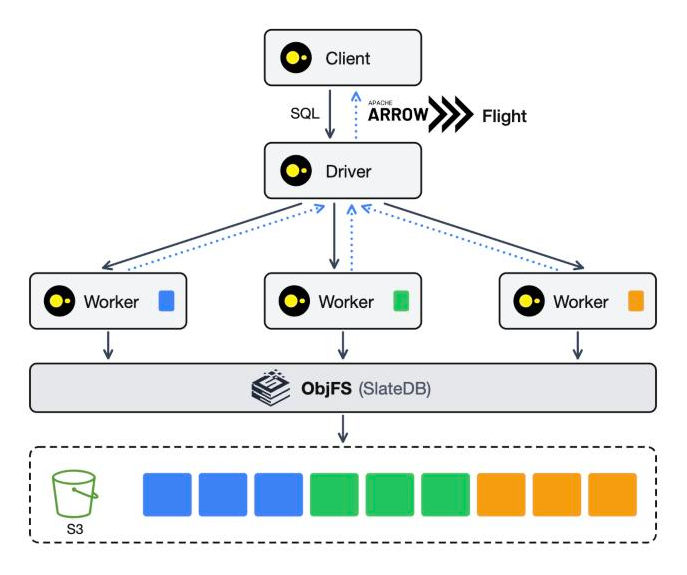
<p>Attach a remote DuckDB server like a local database and keep writing the same SQL. A driver plans and partitions each query, workers execute the pieces, and results come back over Arrow Flight. In the target design, the driver owns a single writer on <a href="#duckdb-object-storage"><code class="language-plaintext highlighter-rouge">duckdb_object_storage</code></a> and every worker reads from S3.</p>

<p><img src="/assets/images/duckdb-extensions/duckherder-architecture.png" alt="duckherder architecture: a client sends SQL to a driver over Arrow Flight; workers execute partitions over data stored on S3 through duckdb_object_storage" /></p>

<div class="language-sql highlighter-rouge"><div class="highlight"><pre class="highlight"><code><span class="n">INSTALL</span> <span class="n">duckherder</span> <span class="k">FROM</span> <span class="n">community</span><span class="p">;</span>
<span class="k">LOAD</span> <span class="n">duckherder</span><span class="p">;</span>
<span class="k">SELECT</span> <span class="n">duckherder_start_local_server</span><span class="p">(</span><span class="mi">8815</span><span class="p">);</span>
<span class="n">ATTACH</span> <span class="k">DATABASE</span> <span class="s1">'localhost:8815'</span> <span class="k">AS</span> <span class="n">dh</span> <span class="p">(</span><span class="k">TYPE</span> <span class="n">duckherder</span><span class="p">);</span>

<span class="k">CREATE</span> <span class="k">TABLE</span> <span class="n">dh</span><span class="p">.</span><span class="n">events</span> <span class="p">(</span><span class="n">id</span> <span class="nb">INTEGER</span><span class="p">,</span> <span class="n">category</span> <span class="nb">VARCHAR</span><span class="p">);</span>
<span class="k">INSERT</span> <span class="k">INTO</span> <span class="n">dh</span><span class="p">.</span><span class="n">events</span> <span class="k">VALUES</span> <span class="p">(</span><span class="mi">1</span><span class="p">,</span> <span class="s1">'click'</span><span class="p">),</span> <span class="p">(</span><span class="mi">2</span><span class="p">,</span> <span class="s1">'view'</span><span class="p">),</span> <span class="p">(</span><span class="mi">3</span><span class="p">,</span> <span class="s1">'click'</span><span class="p">);</span>
<span class="k">SELECT</span> <span class="n">category</span><span class="p">,</span> <span class="k">count</span><span class="p">(</span><span class="o">*</span><span class="p">)</span> <span class="k">FROM</span> <span class="n">dh</span><span class="p">.</span><span class="n">events</span> <span class="k">GROUP</span> <span class="k">BY</span> <span class="k">ALL</span><span class="p">;</span>
</code></pre></div></div>

<p><strong>Best for</strong> experimenting with remote and distributed DuckDB without changing your SQL. <strong>Not for</strong> production yet: it’s experimental, joins still run on the driver, and authentication and worker failover are open problems. It’s a personal project, not affiliated with DuckDB Labs, and the most ambitious item on this list.</p>

<h3 id="duckdb-object-storage"><a href="https://github.com/dentiny/duckdb-object-storage"><code class="language-plaintext highlighter-rouge">duckdb_object_storage</code></a>: a writable DuckDB database on object storage</h3>

<p>DuckDB can attach a <code class="language-plaintext highlighter-rouge">.duckdb</code> file on S3 read-only, but writing one has needed a local disk. This extension keeps the whole database in <a href="https://slatedb.io/">SlateDB</a>, including the write-ahead log and recovery files, on S3-compatible storage or local disk, behind a <code class="language-plaintext highlighter-rouge">duckdb_objfs://</code> path. SlateDB’s in-memory cache is on by default, a local disk cache is one setting away, and <code class="language-plaintext highlighter-rouge">duckdb_objfs_cache_stats()</code> and <code class="language-plaintext highlighter-rouge">duckdb_objfs_io_stats()</code> show what’s happening.</p>

<p><img src="/assets/images/duckdb-extensions/object-storage-flow.png" alt="duckdb_object_storage: one writer stores the database in SlateDB on S3 or local disk; many READ_ONLY readers see commits within about 10 seconds" /></p>

<div class="language-sql highlighter-rouge"><div class="highlight"><pre class="highlight"><code><span class="n">INSTALL</span> <span class="n">duckdb_object_storage</span> <span class="k">FROM</span> <span class="n">community</span><span class="p">;</span>
<span class="k">LOAD</span> <span class="n">cache_httpfs</span><span class="p">;</span>   <span class="c1">-- registers the S3 secret type</span>
<span class="k">LOAD</span> <span class="n">duckdb_object_storage</span><span class="p">;</span>

<span class="k">CREATE</span> <span class="n">SECRET</span> <span class="p">(</span><span class="k">TYPE</span> <span class="n">S3</span><span class="p">,</span> <span class="n">KEY_ID</span> <span class="s1">'...'</span><span class="p">,</span> <span class="n">SECRET</span> <span class="s1">'...'</span><span class="p">,</span> <span class="n">REGION</span> <span class="s1">'us-east-1'</span><span class="p">,</span> <span class="k">SCOPE</span> <span class="s1">'s3://my-bucket/duckdb-data'</span><span class="p">);</span>
<span class="k">SET</span> <span class="n">duckdb_objfs_backend</span> <span class="o">=</span> <span class="s1">'s3'</span><span class="p">;</span>
<span class="k">SET</span> <span class="n">duckdb_objfs_bucket</span> <span class="o">=</span> <span class="s1">'my-bucket'</span><span class="p">;</span>
<span class="k">SET</span> <span class="n">duckdb_objfs_root</span> <span class="o">=</span> <span class="s1">'duckdb-data'</span><span class="p">;</span>

<span class="n">ATTACH</span> <span class="s1">'duckdb_objfs://analytics.db'</span> <span class="k">AS</span> <span class="n">analytics</span><span class="p">;</span>
<span class="k">CREATE</span> <span class="k">TABLE</span> <span class="n">analytics</span><span class="p">.</span><span class="n">items</span> <span class="p">(</span><span class="n">i</span> <span class="nb">INTEGER</span><span class="p">);</span>
<span class="k">INSERT</span> <span class="k">INTO</span> <span class="n">analytics</span><span class="p">.</span><span class="n">items</span> <span class="k">VALUES</span> <span class="p">(</span><span class="mi">1</span><span class="p">),</span> <span class="p">(</span><span class="mi">2</span><span class="p">);</span>
</code></pre></div></div>

<p><strong>Best for</strong> one writer and any number of <code class="language-plaintext highlighter-rouge">READ_ONLY</code> readers sharing a database on S3, with no server to run. <strong>Not for</strong> multiple writers: there’s no file locking yet, so a second writer takes over and the first only finds out when its next flush fails. Run a single writer.</p>

<h3 id="duckdb-opendalfs"><a href="https://github.com/dentiny/duckdb-opendal-filesystem"><code class="language-plaintext highlighter-rouge">duckdb_opendalfs</code></a>: one extension, many backends</h3>

<p>Built on <a href="https://opendal.apache.org/">Apache OpenDAL</a>, it covers <strong>S3-compatible stores, GCS, Azure Blob, Hugging Face, WebDAV, SFTP and more</strong> through ordinary DuckDB secrets, with timeouts and retries on by default.</p>

<p><img src="/assets/images/duckdb-extensions/opendalfs-flow.png" alt="duckdb_opendalfs: plain SQL on gcs:// and other paths goes through Apache OpenDAL to S3, GCS, Azure Blob, Hugging Face, WebDAV, SFTP and more" /></p>

<div class="language-sql highlighter-rouge"><div class="highlight"><pre class="highlight"><code><span class="n">INSTALL</span> <span class="n">duckdb_opendalfs</span> <span class="k">FROM</span> <span class="n">community</span><span class="p">;</span>
<span class="k">LOAD</span> <span class="n">duckdb_opendalfs</span><span class="p">;</span>

<span class="k">CREATE</span> <span class="n">SECRET</span> <span class="n">prod_gcs</span> <span class="p">(</span><span class="k">TYPE</span> <span class="n">opendal_gcs</span><span class="p">,</span> <span class="k">SCOPE</span> <span class="s1">'gcs://analytics'</span><span class="p">,</span> <span class="n">TOKEN</span> <span class="s1">'...'</span><span class="p">);</span>
<span class="k">SELECT</span> <span class="o">*</span> <span class="k">FROM</span> <span class="n">read_parquet</span><span class="p">(</span><span class="s1">'gcs://analytics/events.parquet'</span><span class="p">);</span>
</code></pre></div></div>

<p><strong>Best for</strong> storage that DuckDB’s built-in filesystems don’t reach, and one secrets model across all of them. Pair it with <code class="language-plaintext highlighter-rouge">cache_httpfs</code> to cache any backend on local disk. <strong>Not for</strong> squeezing the last bit of read throughput yet: every read currently pays an extra memory copy (<a href="https://github.com/duckdb/duckdb/discussions/21546">DuckDB discussion #21546</a>).</p>

<p>The other eleven extensions each get a one-line summary on the map at the top of this post.</p>

<details>
  <summary>All 18 repositories</summary>

  <table>
    <thead>
      <tr>
        <th>Extension</th>
        <th>Repository</th>
      </tr>
    </thead>
    <tbody>
      <tr>
        <td><code class="language-plaintext highlighter-rouge">cache_httpfs</code></td>
        <td><a href="https://github.com/dentiny/duck-read-cache-fs">dentiny/duck-read-cache-fs</a></td>
      </tr>
      <tr>
        <td><code class="language-plaintext highlighter-rouge">query_condition_cache</code></td>
        <td><a href="https://github.com/dentiny/duckdb-query-condition-cache">dentiny/duckdb-query-condition-cache</a></td>
      </tr>
      <tr>
        <td><code class="language-plaintext highlighter-rouge">cache_prewarm</code></td>
        <td><a href="https://github.com/dentiny/duckdb-cache-prewarm">dentiny/duckdb-cache-prewarm</a></td>
      </tr>
      <tr>
        <td><code class="language-plaintext highlighter-rouge">lance_conversion</code></td>
        <td><a href="https://github.com/dentiny/duckdb_lance_conversion">dentiny/duckdb_lance_conversion</a></td>
      </tr>
      <tr>
        <td><code class="language-plaintext highlighter-rouge">duckherder</code></td>
        <td><a href="https://github.com/dentiny/duckdb-distributed-execution">dentiny/duckdb-distributed-execution</a></td>
      </tr>
      <tr>
        <td><code class="language-plaintext highlighter-rouge">duckdb_opendalfs</code></td>
        <td><a href="https://github.com/dentiny/duckdb-opendal-filesystem">dentiny/duckdb-opendal-filesystem</a></td>
      </tr>
      <tr>
        <td><code class="language-plaintext highlighter-rouge">curl_httpfs</code></td>
        <td><a href="https://github.com/dentiny/duckdb-curl-filesystem">dentiny/duckdb-curl-filesystem</a></td>
      </tr>
      <tr>
        <td><code class="language-plaintext highlighter-rouge">duckdb_object_storage</code></td>
        <td><a href="https://github.com/dentiny/duckdb-object-storage">dentiny/duckdb-object-storage</a></td>
      </tr>
      <tr>
        <td><code class="language-plaintext highlighter-rouge">compression_fs</code></td>
        <td><a href="https://github.com/dentiny/duckdb-compression-filesystem">dentiny/duckdb-compression-filesystem</a></td>
      </tr>
      <tr>
        <td><code class="language-plaintext highlighter-rouge">hedged_request_fs</code></td>
        <td><a href="https://github.com/dentiny/duckdb-hedged-request">dentiny/duckdb-hedged-request</a></td>
      </tr>
      <tr>
        <td><code class="language-plaintext highlighter-rouge">httpfs_timeout_retry</code></td>
        <td><a href="https://github.com/dentiny/duckdb-httpfs-timeout-retry">dentiny/duckdb-httpfs-timeout-retry</a></td>
      </tr>
      <tr>
        <td><code class="language-plaintext highlighter-rouge">rate_limit_fs</code></td>
        <td><a href="https://github.com/dentiny/duckdb-rate-limit-filesystem">dentiny/duckdb-rate-limit-filesystem</a></td>
      </tr>
      <tr>
        <td><code class="language-plaintext highlighter-rouge">latency_injection_fs</code></td>
        <td><a href="https://github.com/dentiny/duckdb-filesystem-latency-injection">dentiny/duckdb-filesystem-latency-injection</a></td>
      </tr>
      <tr>
        <td><code class="language-plaintext highlighter-rouge">observefs</code></td>
        <td><a href="https://github.com/dentiny/duckdb-filesystem-observability">dentiny/duckdb-filesystem-observability</a></td>
      </tr>
      <tr>
        <td><code class="language-plaintext highlighter-rouge">table_inspector</code></td>
        <td><a href="https://github.com/dentiny/duckdb-table-inspector">dentiny/duckdb-table-inspector</a></td>
      </tr>
      <tr>
        <td><code class="language-plaintext highlighter-rouge">system_stats</code></td>
        <td><a href="https://github.com/dentiny/system_stats">dentiny/system_stats</a></td>
      </tr>
      <tr>
        <td><code class="language-plaintext highlighter-rouge">query_limiter</code></td>
        <td><a href="https://github.com/dentiny/duckdb-query-limiter">dentiny/duckdb-query-limiter</a></td>
      </tr>
      <tr>
        <td><code class="language-plaintext highlighter-rouge">huggingface</code></td>
        <td><a href="https://github.com/dentiny/duckdb-huggingface">dentiny/duckdb-huggingface</a></td>
      </tr>
    </tbody>
  </table>

</details>

<hr />

<h2 id="by-the-numbers">By the numbers</h2>

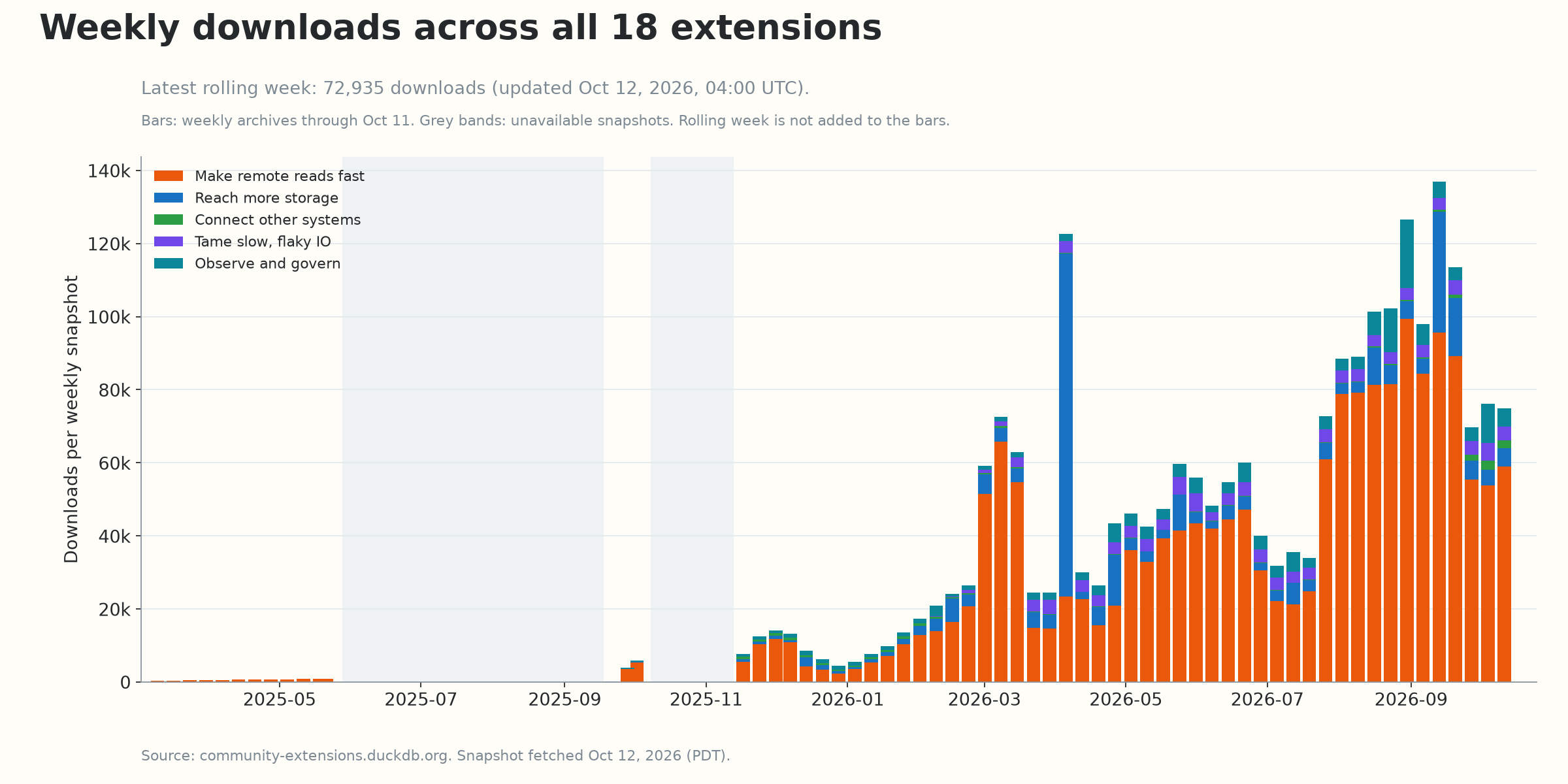
<p><strong>Statistics refreshed October 12, 2026, at 18:43:40 PDT (October 13, 01:43:40 UTC).</strong> The latest <a href="https://community-extensions.duckdb.org/downloads-last-week.json">rolling-week report</a> was updated October 12 at 04:00:07 UTC; these are the latest official figures available at retrieval, rather than a live counter. The 18 extensions have <strong>72,935 reported downloads in that rolling week</strong>.</p>

<p>Archive totals sum the available <a href="https://community-extensions.duckdb.org/download-stats-weekly/2026/41.json">weekly snapshots</a> from 2025 week 10 through 2026 week 41 (latest update: October 11, 2026, 04:00:07 UTC). The current week 42 report overlaps week 41, so it is shown separately and is not added to the archive totals. Missing weeks are not estimated, and some older snapshots were taken at irregular intervals: these sums are not exact lifetime totals. DuckDB’s <a href="https://duckdb.org/community_extensions/download_metrics">download metrics</a> estimate downloads across versions and platforms, not unique users. A dash means no published count; totals include only reported values.</p>

<p><img src="/assets/images/duckdb-extensions/downloads-by-extension.png" alt="Per-extension downloads summed over available weekly archives through October 11, 2026; total 2,381,700, log scale" /></p>

<p><img src="/assets/images/duckdb-extensions/weekly-downloads.png" alt="Weekly archived downloads stacked by focus area through October 11, 2026; latest rolling week separately reports 72,935 downloads" /></p>

<details>
  <summary>Full table</summary>

  <table>
    <thead>
      <tr>
        <th>Extension</th>
        <th>Group</th>
        <th>First release</th>
        <th style="text-align: right">Archive downloads</th>
      </tr>
    </thead>
    <tbody>
      <tr>
        <td><code class="language-plaintext highlighter-rouge">cache_httpfs</code></td>
        <td>Remote reads</td>
        <td>2025-03</td>
        <td style="text-align: right">1,738,009</td>
      </tr>
      <tr>
        <td><code class="language-plaintext highlighter-rouge">curl_httpfs</code></td>
        <td>Storage</td>
        <td>2025-09</td>
        <td style="text-align: right">295,759</td>
      </tr>
      <tr>
        <td><code class="language-plaintext highlighter-rouge">observefs</code></td>
        <td>Observe</td>
        <td>2025-09</td>
        <td style="text-align: right">81,036</td>
      </tr>
      <tr>
        <td><code class="language-plaintext highlighter-rouge">system_stats</code></td>
        <td>Observe</td>
        <td>2025-12</td>
        <td style="text-align: right">40,931</td>
      </tr>
      <tr>
        <td><code class="language-plaintext highlighter-rouge">httpfs_timeout_retry</code></td>
        <td>Flaky IO</td>
        <td>2026-02</td>
        <td style="text-align: right">30,289</td>
      </tr>
      <tr>
        <td><code class="language-plaintext highlighter-rouge">table_inspector</code></td>
        <td>Observe</td>
        <td>2026-02</td>
        <td style="text-align: right">28,790</td>
      </tr>
      <tr>
        <td><code class="language-plaintext highlighter-rouge">cache_prewarm</code></td>
        <td>Remote reads</td>
        <td>2026-02</td>
        <td style="text-align: right">28,080</td>
      </tr>
      <tr>
        <td><code class="language-plaintext highlighter-rouge">rate_limit_fs</code></td>
        <td>Flaky IO</td>
        <td>2026-02</td>
        <td style="text-align: right">27,831</td>
      </tr>
      <tr>
        <td><code class="language-plaintext highlighter-rouge">hedged_request_fs</code></td>
        <td>Flaky IO</td>
        <td>2026-02</td>
        <td style="text-align: right">27,269</td>
      </tr>
      <tr>
        <td><code class="language-plaintext highlighter-rouge">latency_injection_fs</code></td>
        <td>Flaky IO</td>
        <td>2026-03</td>
        <td style="text-align: right">25,402</td>
      </tr>
      <tr>
        <td><code class="language-plaintext highlighter-rouge">query_condition_cache</code></td>
        <td>Remote reads</td>
        <td>2026-04</td>
        <td style="text-align: right">18,544</td>
      </tr>
      <tr>
        <td><code class="language-plaintext highlighter-rouge">duckherder</code></td>
        <td>Other systems</td>
        <td>2025-11</td>
        <td style="text-align: right">14,809</td>
      </tr>
      <tr>
        <td><code class="language-plaintext highlighter-rouge">query_limiter</code></td>
        <td>Observe</td>
        <td>2026-07</td>
        <td style="text-align: right">9,339</td>
      </tr>
      <tr>
        <td><code class="language-plaintext highlighter-rouge">duckdb_opendalfs</code></td>
        <td>Storage</td>
        <td>2026-07</td>
        <td style="text-align: right">8,676</td>
      </tr>
      <tr>
        <td><code class="language-plaintext highlighter-rouge">huggingface</code></td>
        <td>Other systems</td>
        <td>2026-08</td>
        <td style="text-align: right">4,812</td>
      </tr>
      <tr>
        <td><code class="language-plaintext highlighter-rouge">lance_conversion</code></td>
        <td>Other systems</td>
        <td>2026-09</td>
        <td style="text-align: right">1,765</td>
      </tr>
      <tr>
        <td><code class="language-plaintext highlighter-rouge">duckdb_object_storage</code></td>
        <td>Storage</td>
        <td>2026-09</td>
        <td style="text-align: right">359</td>
      </tr>
      <tr>
        <td><code class="language-plaintext highlighter-rouge">compression_fs</code></td>
        <td>Storage</td>
        <td>2026-09</td>
        <td style="text-align: right">—</td>
      </tr>
      <tr>
        <td><strong>Total reported</strong></td>
        <td> </td>
        <td> </td>
        <td style="text-align: right"><strong>2,381,700</strong></td>
      </tr>
    </tbody>
  </table>

</details>

<hr />

<h2 id="lets-build-together">Let’s build together</h2>

<p><img src="/assets/images/duckdb-extensions/help-wanted.png" alt="Open problems from each project's roadmap, with contact details" /></p>

<p>Most of these extensions started as someone’s problem: a slow dashboard, a flaky bucket, a dataset that needed to be in Lance. If you have one, I want to hear about it.</p>

<ul>
  <li><strong>Feature requests and bugs:</strong> open an issue in the extension’s repository (listed above).</li>
  <li><strong>Collaboration:</strong> whether it’s one of the open problems above, a new extension, or running these in production at your company, email me at <a href="mailto:dentinyhao@gmail.com">dentinyhao@gmail.com</a>.</li>
  <li><strong>Just using them?</strong> Tell me what works and what doesn’t. That’s usually how the next extension starts.</li>
</ul>

<!-- TODO(hao): one-line "about me" (current role, prior work). -->

<h2 id="thanks">Thanks</h2>

<p>Thank you to <a href="https://github.com/peterxcli">@peterxcli</a> (<code class="language-plaintext highlighter-rouge">cache_prewarm</code>, <code class="language-plaintext highlighter-rouge">duckdb_object_storage</code>, <code class="language-plaintext highlighter-rouge">observefs</code>, <code class="language-plaintext highlighter-rouge">query_condition_cache</code>), <a href="https://github.com/DouEnergy">@DouEnergy</a> (<code class="language-plaintext highlighter-rouge">cache_httpfs</code>) and <a href="https://github.com/Andrewtangtang">@Andrewtangtang</a> (<code class="language-plaintext highlighter-rouge">duckdb_object_storage</code>, <code class="language-plaintext highlighter-rouge">duckherder</code>, <code class="language-plaintext highlighter-rouge">query_condition_cache</code>, <code class="language-plaintext highlighter-rouge">table_inspector</code>). Thanks also to the DuckDB Labs team and the <code class="language-plaintext highlighter-rouge">community-extensions</code> maintainers, who review these extensions and build them for every platform on every release.</p>]]></content><author><name>dentiny</name></author><category term="DuckDB" /><category term="Extensions" /><category term="Storage" /><category term="Caching" /><summary type="html"><![CDATA[18 DuckDB community extensions for caching, storage, accessibility, IO resilience and observability: what each one does, how they fit together, and where I'd love help.]]></summary></entry><entry><title type="html">A Real DuckDB Database in S3, With Nothing Else to Run</title><link href="https://dentiny.github.io/posts/duckdb-on-object-storage/" rel="alternate" type="text/html" title="A Real DuckDB Database in S3, With Nothing Else to Run" /><published>2026-10-09T00:00:00-07:00</published><updated>2026-10-09T00:00:00-07:00</updated><id>https://dentiny.github.io/posts/duckdb-on-object-storage</id><content type="html" xml:base="https://dentiny.github.io/posts/duckdb-on-object-storage/"><![CDATA[<p><strong><code class="language-plaintext highlighter-rouge">duckdb_object_storage</code> stores native DuckDB databases (indexes, constraints, WAL and all) directly in object storage. There’s no table format, no catalog database and no fork of DuckDB. You just need DuckDB and a bucket.</strong></p>

<!--more-->

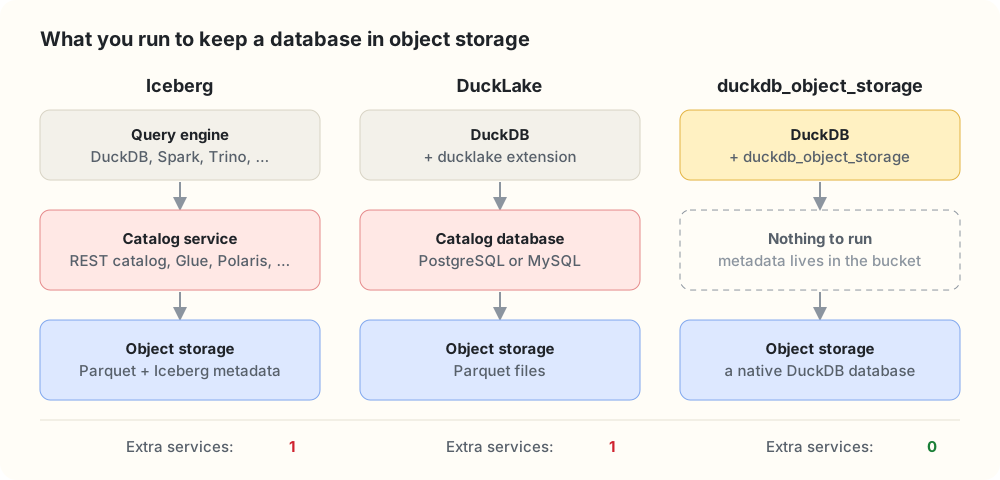
<p><img src="/assets/images/duckdb-object-storage/stack-comparison.svg" alt="Iceberg needs a catalog service and DuckLake needs a catalog database. duckdb_object_storage needs only the bucket." /></p>

<p><em>Every option stores data in object storage. The difference is what else you have to keep running next to it.</em></p>

<p><strong>In brief</strong></p>

<ul>
  <li><code class="language-plaintext highlighter-rouge">ATTACH 'duckdb_objfs://analytics.db'</code> gives you an ordinary DuckDB database whose bytes live in S3. It’s a DuckDB community extension built on <a href="https://slatedb.io/">SlateDB</a> and <a href="https://opendal.apache.org/">Apache OpenDAL</a>.</li>
  <li><strong>Nothing to run but the bucket.</strong> No catalog service, no Postgres, no coordinator, no compactor. All metadata, even writer fencing, lives in object storage.</li>
  <li><strong>Everything DuckDB does still works.</strong> ART indexes, enforced keys, the WAL, checkpoints, <code class="language-plaintext highlighter-rouge">COPY</code> and extensions behave exactly as on a laptop, because we replaced the disk, not the database.</li>
  <li><strong>One writer, many readers, never inconsistent.</strong> Readers only ever see committed states. That makes it the storage layer for our distributed engine, <a href="https://github.com/dentiny/duckdb-distributed-execution">Duckherder</a>.</li>
  <li><strong>Close to native speed.</strong> Reads are within about 10% of native DuckDB on local storage, and cold S3 reads are about 1.2× native DuckDB over HTTPFS.</li>
  <li><strong>Tested with DuckDB’s own test suite.</strong></li>
</ul>

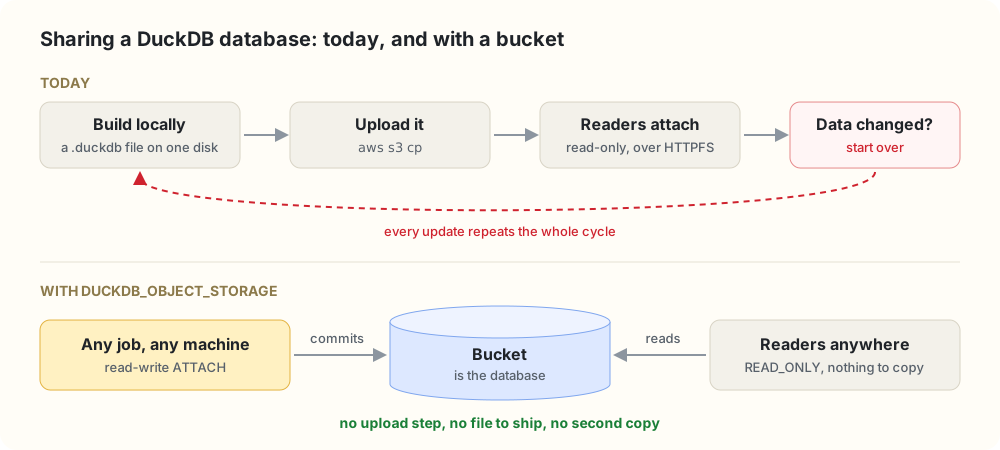
<p>DuckDB is a database in a file. That’s its charm, and it’s also the problem the moment a second machine shows up.</p>

<p><img src="/assets/images/duckdb-object-storage/workflow.svg" alt="Today: build a .duckdb file locally, upload it, let readers attach it read-only over HTTPFS, and start over whenever the data changes. With the extension: any job attaches the bucket read-write, readers attach it read-only, and there's nothing to ship." /></p>

<p>The rest of the data stack settled this years ago: object storage is the source of truth, and compute is disposable. We wanted DuckDB to work that way too, for ETL jobs on ephemeral compute, fleets of dashboards and services, and teams that want a database rather than a lakehouse, without DuckDB giving up being a database.</p>

<h2 id="what-it-looks-like">What it looks like</h2>

<div class="language-sql highlighter-rouge"><div class="highlight"><pre class="highlight"><code><span class="k">FORCE</span> <span class="n">INSTALL</span> <span class="n">duckdb_object_storage</span> <span class="k">FROM</span> <span class="n">community</span><span class="p">;</span>
<span class="k">LOAD</span> <span class="n">duckdb_object_storage</span><span class="p">;</span>
<span class="k">LOAD</span> <span class="n">httpfs</span><span class="p">;</span>  <span class="c1">-- provides the S3 secret type</span>

<span class="c1">-- Credentials come from DuckDB's Secret Manager, like any other S3 access.</span>
<span class="k">CREATE</span> <span class="n">SECRET</span> <span class="p">(</span><span class="k">TYPE</span> <span class="n">S3</span><span class="p">,</span> <span class="n">PROVIDER</span> <span class="n">credential_chain</span><span class="p">,</span> <span class="n">REGION</span> <span class="s1">'us-east-1'</span><span class="p">,</span> <span class="k">SCOPE</span> <span class="s1">'s3://my-bucket'</span><span class="p">);</span>

<span class="k">SET</span> <span class="n">duckdb_objfs_backend</span> <span class="o">=</span> <span class="s1">'s3'</span><span class="p">;</span>
<span class="k">SET</span> <span class="n">duckdb_objfs_bucket</span>  <span class="o">=</span> <span class="s1">'my-bucket'</span><span class="p">;</span>

<span class="n">ATTACH</span> <span class="s1">'duckdb_objfs://analytics.db'</span> <span class="k">AS</span> <span class="n">db</span><span class="p">;</span>
<span class="n">USE</span> <span class="n">db</span><span class="p">;</span>

<span class="k">CREATE</span> <span class="k">TABLE</span> <span class="n">customers</span> <span class="p">(</span>
    <span class="n">id</span>    <span class="nb">BIGINT</span> <span class="k">PRIMARY</span> <span class="k">KEY</span><span class="p">,</span>
    <span class="n">email</span> <span class="nb">VARCHAR</span> <span class="k">UNIQUE</span> <span class="k">NOT</span> <span class="k">NULL</span>
<span class="p">);</span>
<span class="k">CREATE</span> <span class="k">TABLE</span> <span class="n">orders</span> <span class="p">(</span>
    <span class="n">id</span>          <span class="nb">BIGINT</span> <span class="k">PRIMARY</span> <span class="k">KEY</span><span class="p">,</span>
    <span class="n">customer_id</span> <span class="nb">BIGINT</span> <span class="k">REFERENCES</span> <span class="n">customers</span><span class="p">(</span><span class="n">id</span><span class="p">),</span>
    <span class="n">amount</span>      <span class="nb">DECIMAL</span><span class="p">(</span><span class="mi">12</span><span class="p">,</span> <span class="mi">2</span><span class="p">)</span> <span class="k">CHECK</span> <span class="p">(</span><span class="n">amount</span> <span class="o">&gt;=</span> <span class="mi">0</span><span class="p">)</span>
<span class="p">);</span>
<span class="k">CREATE</span> <span class="k">INDEX</span> <span class="n">orders_by_customer</span> <span class="k">ON</span> <span class="n">orders</span><span class="p">(</span><span class="n">customer_id</span><span class="p">);</span>

<span class="k">INSERT</span> <span class="k">INTO</span> <span class="n">customers</span> <span class="k">VALUES</span> <span class="p">(</span><span class="mi">1</span><span class="p">,</span> <span class="s1">'ada@example.com'</span><span class="p">);</span>
<span class="k">INSERT</span> <span class="k">INTO</span> <span class="n">orders</span> <span class="k">VALUES</span> <span class="p">(</span><span class="mi">10</span><span class="p">,</span> <span class="mi">1</span><span class="p">,</span> <span class="mi">42</span><span class="p">.</span><span class="mi">00</span><span class="p">);</span>
<span class="k">CHECKPOINT</span> <span class="n">db</span><span class="p">;</span>

<span class="k">INSERT</span> <span class="k">INTO</span> <span class="n">orders</span> <span class="k">VALUES</span> <span class="p">(</span><span class="mi">11</span><span class="p">,</span> <span class="mi">99</span><span class="p">,</span> <span class="mi">1</span><span class="p">.</span><span class="mi">00</span><span class="p">);</span>
<span class="c1">-- Constraint Error: Violates foreign key constraint because key "id: 99"</span>
<span class="c1">-- does not exist in the referenced table</span>
</code></pre></div></div>

<p>None of that SQL knows it’s talking to S3, and the constraints are enforced exactly as on local disk. On another machine, a second process can attach the same database read-only and query it right away:</p>

<div class="language-sql highlighter-rouge"><div class="highlight"><pre class="highlight"><code><span class="n">ATTACH</span> <span class="s1">'duckdb_objfs://analytics.db'</span> <span class="k">AS</span> <span class="n">db</span> <span class="p">(</span><span class="n">READ_ONLY</span><span class="p">);</span>
<span class="k">SELECT</span> <span class="k">c</span><span class="p">.</span><span class="n">email</span><span class="p">,</span> <span class="k">sum</span><span class="p">(</span><span class="n">o</span><span class="p">.</span><span class="n">amount</span><span class="p">)</span> <span class="k">FROM</span> <span class="n">db</span><span class="p">.</span><span class="n">orders</span> <span class="n">o</span> <span class="k">JOIN</span> <span class="n">db</span><span class="p">.</span><span class="n">customers</span> <span class="k">c</span> <span class="k">ON</span> <span class="n">o</span><span class="p">.</span><span class="n">customer_id</span> <span class="o">=</span> <span class="k">c</span><span class="p">.</span><span class="n">id</span> <span class="k">GROUP</span> <span class="k">BY</span> <span class="k">ALL</span><span class="p">;</span>
</code></pre></div></div>

<h2 id="a-table-format-is-not-a-database">A table format is not a database</h2>

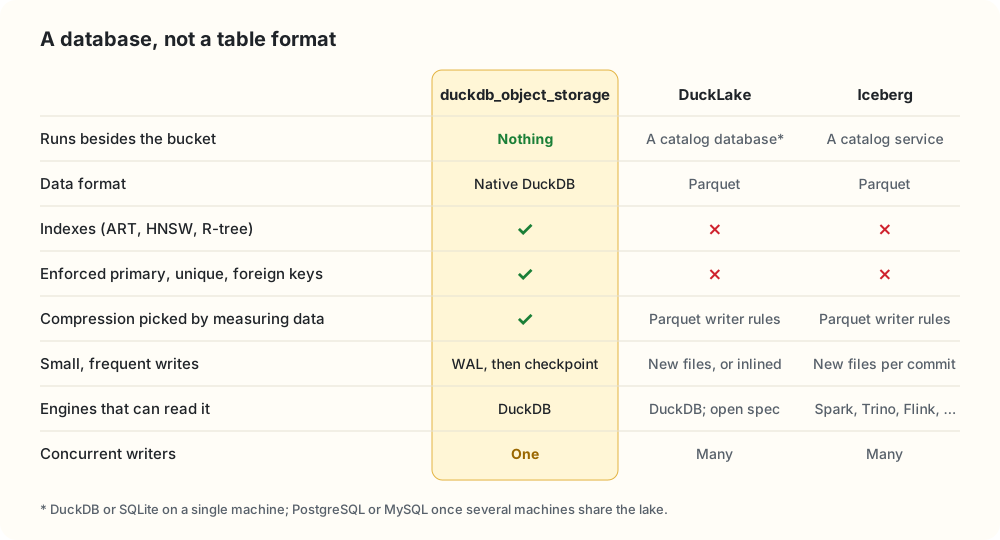
<p>DuckDB can already read and write object storage through Iceberg and DuckLake, and we use both. But they solve a different problem: letting many engines share Parquet tables, at the price of a catalog and a narrower feature set. A table format gives you the features the format defines. A database gives you everything the database does.</p>

<p><img src="/assets/images/duckdb-object-storage/feature-matrix.svg" alt="Comparison of duckdb_object_storage, DuckLake and Iceberg: what runs besides the bucket, data format, indexes, enforced keys, adaptive compression, small writes, which engines can read it, and concurrent writers." /></p>

<p>Storing DuckDB’s own format is what keeps the left column green:</p>

<ul>
  <li><strong>Indexes and constraints.</strong> ART indexes back primary keys, unique constraints and <code class="language-plaintext highlighter-rouge">CREATE INDEX</code>. <code class="language-plaintext highlighter-rouge">spatial</code> keeps R-trees and <code class="language-plaintext highlighter-rouge">vss</code> can persist HNSW indexes (still experimental) in the same file. Parquet has nowhere to put them.</li>
  <li><strong>The whole catalog and type system.</strong> Views, macros, sequences, enums and every DuckDB type, with nothing mapped to Parquet.</li>
  <li><strong>Cheap small writes.</strong> A one-row <code class="language-plaintext highlighter-rouge">UPDATE</code> goes into the WAL, and the next checkpoint folds it in. No new data file, no delete file, no compaction job.</li>
  <li><strong>Everything around the database.</strong> <code class="language-plaintext highlighter-rouge">COPY</code>, <code class="language-plaintext highlighter-rouge">EXPORT DATABASE</code>, <code class="language-plaintext highlighter-rouge">CHECKPOINT</code>, and every extension that works on an attached database.</li>
</ul>

<h3 id="compression-that-measures-the-data">Compression that measures the data</h3>

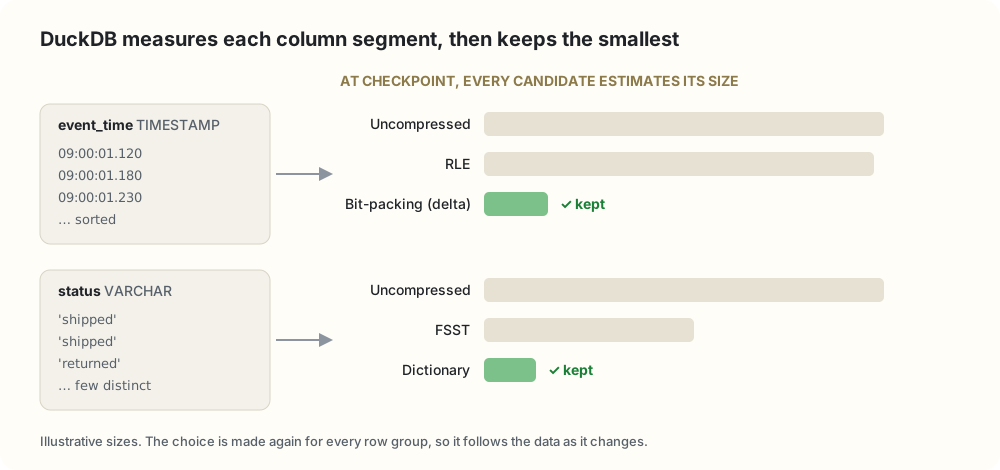
<p><img src="/assets/images/duckdb-object-storage/compression.svg" alt="For a sorted timestamp column, bit-packing beats RLE and uncompressed, so DuckDB keeps it. For a low-cardinality string column, dictionary beats FSST and uncompressed." /></p>

<p>DuckDB compresses every column with lightweight codecs: constant, RLE, bit-packing, frame-of-reference, dictionary, FSST for strings and ALP for floating point. They’re cheap to decode, and constant and dictionary vectors can flow into the execution engine without being expanded first.</p>

<p>The codec isn’t picked by a fixed rule. At checkpoint, every candidate runs an analyze pass over the column segment and estimates its compressed size, and DuckDB keeps the smallest, again for every row group. Parquet has dictionary and RLE encodings too, but writers usually choose them by fixed rules and add Snappy or ZSTD on top, which every reader has to undo before it can scan. Because blocks reach us already compressed, we leave SlateDB’s own compression off.</p>

<p>And you don’t have to choose between the two worlds. One DuckDB session can attach a <code class="language-plaintext highlighter-rouge">duckdb_objfs://</code> database, an Iceberg catalog and a DuckLake together, and join across all three.</p>

<blockquote>
  <p>The only thing to operate is a bucket.</p>
</blockquote>

<p>Every extra service is something to provision, secure, back up, upgrade and page someone about. Here the bucket is the entire deployment. SlateDB keeps its manifest in the bucket and uses it to coordinate writers, so even writer fencing needs nothing else.</p>

<h2 id="replace-the-disk-not-the-database">Replace the disk, not the database</h2>

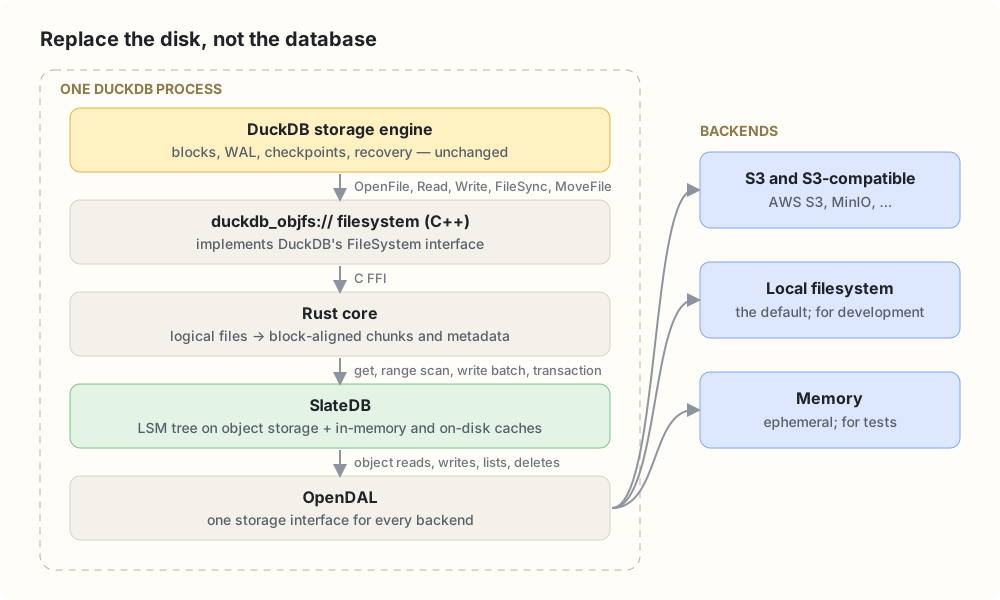
<p><img src="/assets/images/duckdb-object-storage/architecture.svg" alt="The DuckDB storage engine calls a duckdb_objfs filesystem, which calls a Rust core, SlateDB and OpenDAL, which talk to S3, the local filesystem or memory." /></p>

<p>The extension registers a DuckDB <code class="language-plaintext highlighter-rouge">FileSystem</code> for the <code class="language-plaintext highlighter-rouge">duckdb_objfs://</code> scheme. DuckDB’s storage engine opens, reads, writes, syncs, moves and removes files as it always does; it just happens to be talking to us. A thin C++ layer forwards each call over a C FFI to a Rust core, which maps files onto SlateDB.</p>

<blockquote>
  <p>We didn’t change DuckDB’s storage engine. We replaced the disk underneath it.</p>
</blockquote>

<p>Everything else follows from that. DuckDB’s on-disk format is untouched, so every feature above comes along, and so will the storage features DuckDB adds in future releases.</p>

<h3 id="why-not-one-object-per-file">Why not one object per file?</h3>

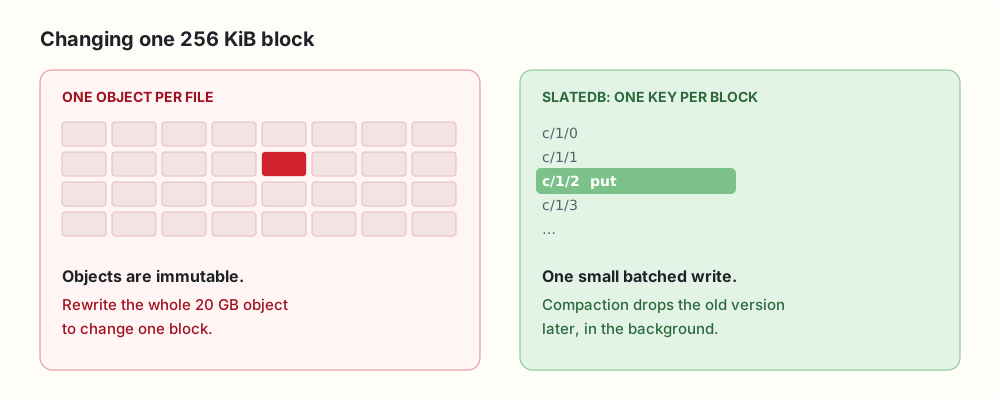
<p><img src="/assets/images/duckdb-object-storage/one-object.svg" alt="Left: with one object per file, changing one block means rewriting the whole 20 GB object. Right: with SlateDB, changing one block is one small batched write of one key, and compaction removes the old version later." /></p>

<p>DuckDB updates its files in place. Objects are immutable. So we needed a storage engine built for exactly that mismatch, and <a href="https://slatedb.io/">SlateDB</a> is one: an embedded LSM tree whose WAL, memtable flushes and SSTs all live in object storage. It gives us batched durable writes, atomic write batches, transactions, non-fencing readers and read caching. Its compaction and garbage collection run inside the writer process, so they don’t need a service either. (SlateDB and OpenDAL are Rust libraries, which is why the core is written in Rust.)</p>

<h3 id="one-code-path-for-every-backend-opendal">One code path for every backend: OpenDAL</h3>

<p>SlateDB reaches storage through an adapter over an <a href="https://opendal.apache.org/">Apache OpenDAL</a> <code class="language-plaintext highlighter-rouge">Operator</code>. Picking a backend just means building a different <code class="language-plaintext highlighter-rouge">Operator</code>: S3 (or MinIO), a local directory, or memory. Everything above it is the same code. OpenDAL also gives us layers, which is how <code class="language-plaintext highlighter-rouge">duckdb_objfs_io_stats()</code> records request counts, latency and bytes on any backend, and correct semantics per backend, such as atomic writes on the local filesystem. GCS, Azure Blob Storage and HDFS are mostly a feature flag away.</p>

<h3 id="every-block-is-exactly-one-key">Every block is exactly one key</h3>

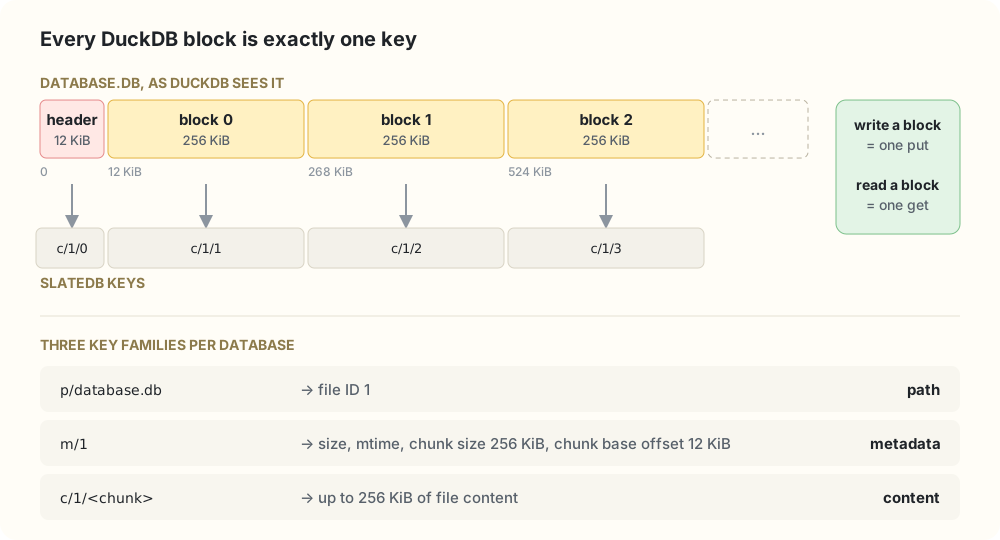
<p><img src="/assets/images/duckdb-object-storage/chunk-layout.svg" alt="A DuckDB file's 12 KiB header and 256 KiB blocks each map to one SlateDB key. Paths, metadata and content use three separate key prefixes." /></p>

<p>Each database gets its own SlateDB instance with a tiny filesystem inside: a path key maps a file name to an ID, a metadata key holds size and layout, and content lives in chunks under <code class="language-plaintext highlighter-rouge">c/&lt;file id&gt;/&lt;chunk index&gt;</code>. Fixed-width hex keeps a file’s chunks next to each other, so a byte range is one range scan.</p>

<p>The trick is the geometry. Chunks are 256 KiB, DuckDB’s block size, and they start after a 12 KiB offset, DuckDB’s header size. So every block lands on exactly one chunk: writing a block is one <code class="language-plaintext highlighter-rouge">put</code>, reading it is one <code class="language-plaintext highlighter-rouge">get</code>. Before we aligned them, every block straddled two chunks and every write was a read-modify-write of both.</p>

<h3 id="fsync-means-durable-in-the-bucket">fsync means durable in the bucket</h3>

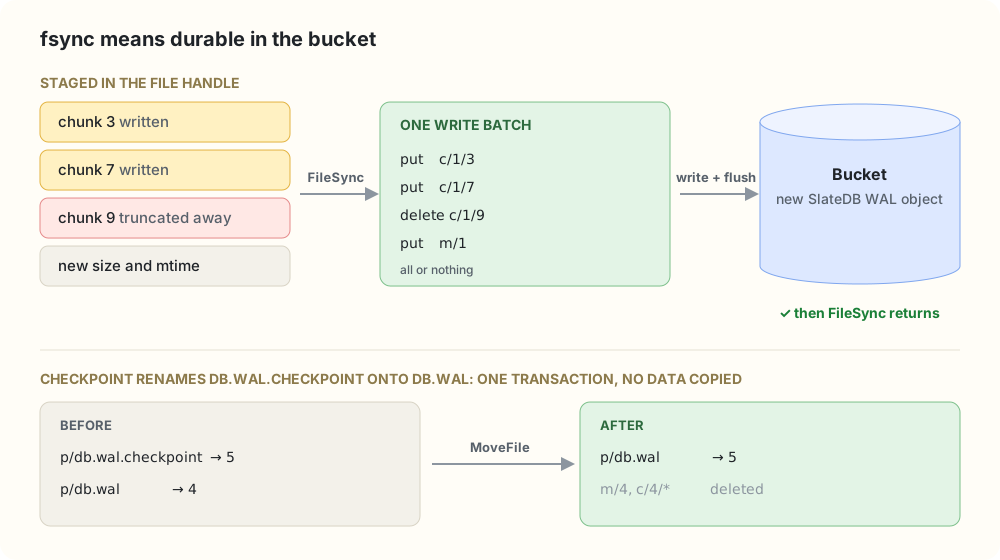
<p><img src="/assets/images/duckdb-object-storage/write-path.svg" alt="FileSync puts staged chunk writes, deletes and the metadata update in one write batch and flushes it to the bucket. A checkpoint's rename is one transaction that only re-points a path key." /></p>

<p>Writes are staged per file handle. On <code class="language-plaintext highlighter-rouge">FileSync</code>, DuckDB’s <code class="language-plaintext highlighter-rouge">fsync</code>, every dirty chunk, truncated chunk and the new metadata go into one write batch, which is flushed to object storage before the call returns. So DuckDB’s durability rules carry over unchanged, and no reader can see a file size the stored chunks don’t back. Renames are transactions too: the checkpoint’s <code class="language-plaintext highlighter-rouge">db.wal.checkpoint</code> → <code class="language-plaintext highlighter-rouge">db.wal</code> move just re-points a path key, with no data copied.</p>

<h3 id="one-writer-many-readers">One writer, many readers</h3>

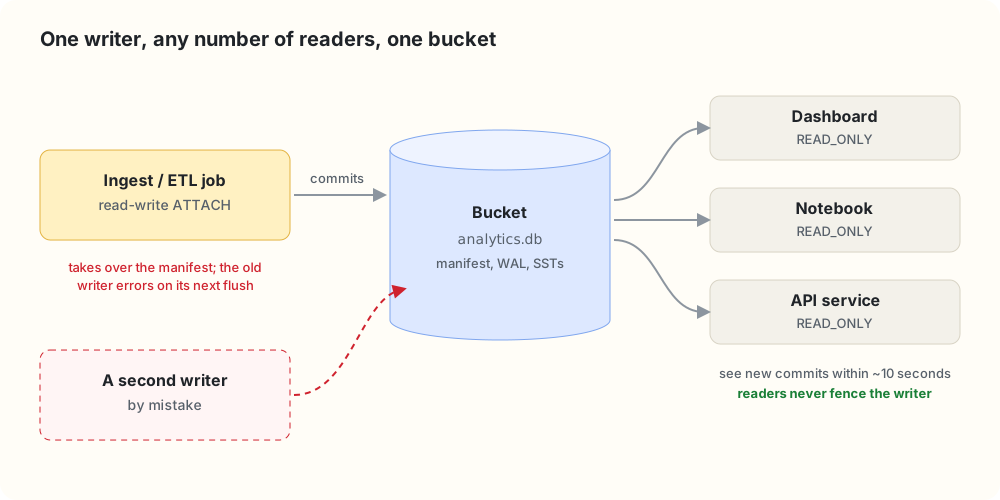
<p><img src="/assets/images/duckdb-object-storage/readers-writer.svg" alt="An ingest job writes to the bucket while dashboards, notebooks and API services attach read-only. A second writer would take over the manifest and fence the first." /></p>

<p>The writer opens SlateDB on the first read-write <code class="language-plaintext highlighter-rouge">ATTACH</code>, and its durable batches are the only way the database changes. Readers use SlateDB’s non-fencing reader, so attaching <code class="language-plaintext highlighter-rouge">READ_ONLY</code> from anywhere never disturbs the writer. A second writer by mistake is caught by manifest fencing: the newer one takes over, and the older one gets an I/O error instead of quietly diverging.</p>

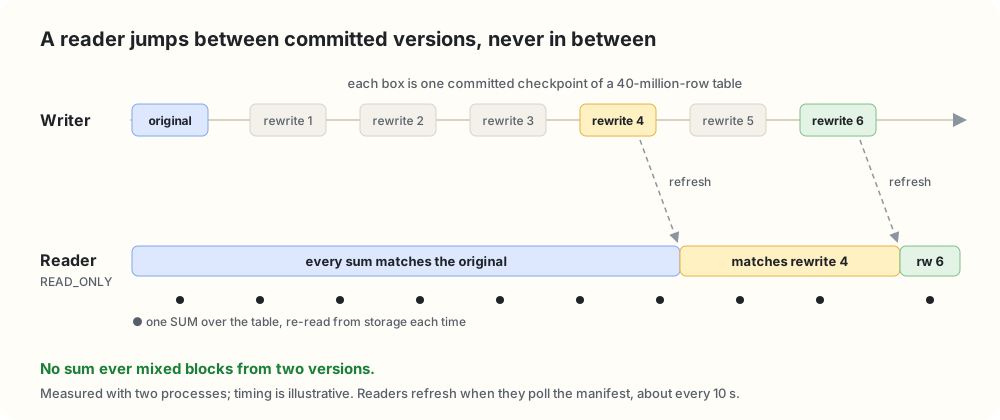
<p>The principle behind it: <strong>a reader only ever sees a state the writer committed.</strong> It works from a checkpoint of the writer’s manifest and moves to a newer one as a whole, about every ten seconds. We tested exactly that:</p>

<p><img src="/assets/images/duckdb-object-storage/snapshot-timeline.svg" alt="A writer rewrites a 40-million-row table six times. A read-only reader that sums the table repeatedly sees the original, then rewrite 4, then rewrite 6, and never a mix of versions." /></p>

<blockquote>
  <p>Readers can be a little behind. They are never inconsistent.</p>
</blockquote>

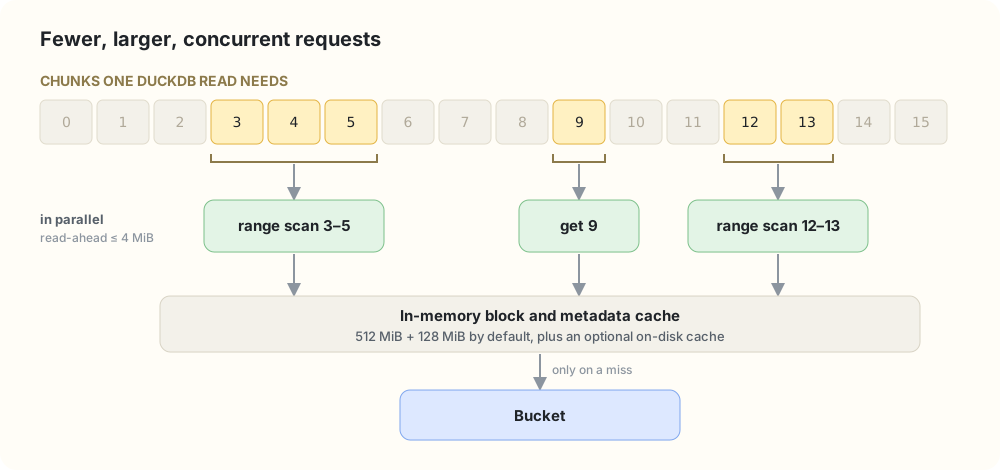
<h3 id="fewer-larger-concurrent-requests">Fewer, larger, concurrent requests</h3>

<p><img src="/assets/images/duckdb-object-storage/read-path.svg" alt="The chunks a read needs are grouped into contiguous runs. Each run becomes one range scan or point lookup, issued in parallel and served from cache before the bucket." /></p>

<p>Object storage charges latency per request, so reads are grouped into contiguous runs of chunks, each fetched with one range scan (or one point lookup), all in parallel. Read-ahead follows the bytes actually requested, capped at 4 MiB. In front of the bucket sit a 512 MiB block cache and a 128 MiB metadata cache, plus an optional disk cache that survives restarts.</p>

<h3 id="fitting-into-duckdb">Fitting into DuckDB</h3>

<ul>
  <li><strong>Credentials come from DuckDB’s Secret Manager</strong>, the standard <code class="language-plaintext highlighter-rouge">TYPE S3</code> secret with scopes, <code class="language-plaintext highlighter-rouge">credential_chain</code>, MinIO endpoints and anonymous access.</li>
  <li><strong>Only durable files go to the bucket.</strong> Spill files stay on local disk, even if <code class="language-plaintext highlighter-rouge">temp_directory</code> points at <code class="language-plaintext highlighter-rouge">duckdb_objfs://</code>.</li>
  <li><strong>Settings fail loudly.</strong> Changing backend or cache settings after first use is an error, not a silent no-op.</li>
  <li><strong>You can see what it’s doing</strong> with <code class="language-plaintext highlighter-rouge">duckdb_objfs_cache_stats()</code> and <code class="language-plaintext highlighter-rouge">duckdb_objfs_io_stats()</code>.</li>
</ul>

<h2 id="the-storage-layer-for-distributed-duckdb">The storage layer for distributed DuckDB</h2>

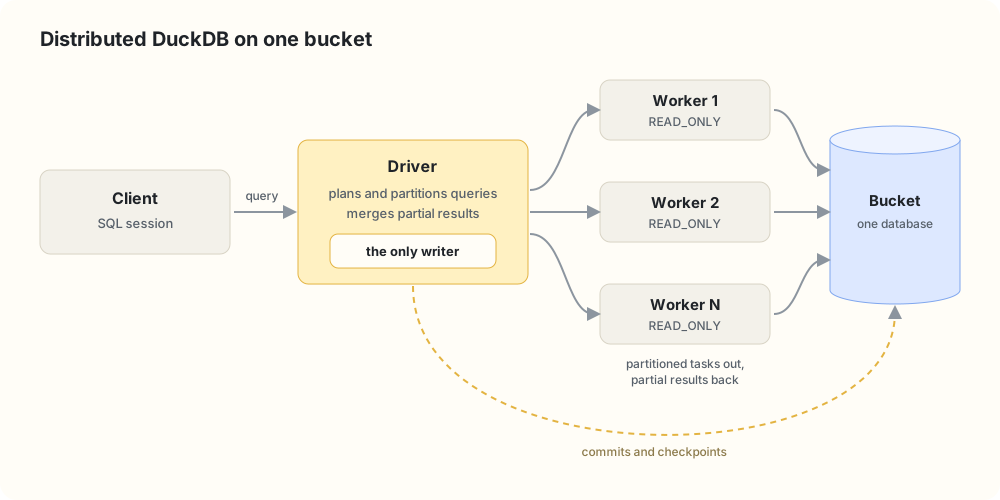
<p><img src="/assets/images/duckdb-object-storage/distributed.svg" alt="A client sends a query to a driver that is the only writer. The driver fans partitioned tasks out to read-only workers, which all read the same database from one bucket." /></p>

<p>This extension is also the prerequisite for <a href="https://github.com/dentiny/duckdb-distributed-execution">Duckherder</a>, our distributed execution extension for DuckDB. A driver plans a query, sends partitioned tasks to workers over Arrow Flight, and merges the results. That needs every worker to read the same data without copying it, which is exactly the model above: the driver owns the only writer, every worker is a read-only attachment, and snapshot-consistent reads mean no worker ever computes over a half-written state. Adding a worker means starting another reader. No data to copy, no shards to rebalance.</p>

<p>Here’s what that looks like. The driver registers its workers, and a client attaches a database whose bytes live in the bucket:</p>

<div class="language-sql highlighter-rouge"><div class="highlight"><pre class="highlight"><code><span class="c1">-- On the driver: start the control node and register the workers.</span>
<span class="k">SELECT</span> <span class="n">duckherder_start_local_server</span><span class="p">(</span><span class="mi">8815</span><span class="p">);</span>
<span class="k">SELECT</span> <span class="n">duckherder_register_worker</span><span class="p">(</span><span class="s1">'worker-1'</span><span class="p">,</span> <span class="s1">'grpc://10.0.0.11:8816'</span><span class="p">);</span>
<span class="k">SELECT</span> <span class="n">duckherder_register_worker</span><span class="p">(</span><span class="s1">'worker-2'</span><span class="p">,</span> <span class="s1">'grpc://10.0.0.12:8816'</span><span class="p">);</span>
<span class="k">SELECT</span> <span class="n">duckherder_register_worker</span><span class="p">(</span><span class="s1">'worker-3'</span><span class="p">,</span> <span class="s1">'grpc://10.0.0.13:8816'</span><span class="p">);</span>
<span class="k">SELECT</span> <span class="n">duckherder_register_worker</span><span class="p">(</span><span class="s1">'worker-4'</span><span class="p">,</span> <span class="s1">'grpc://10.0.0.14:8816'</span><span class="p">);</span>

<span class="c1">-- Write through the driver. The database is stored with duckdb_object_storage.</span>
<span class="n">ATTACH</span> <span class="s1">'localhost:8815/sales.db'</span> <span class="k">AS</span> <span class="n">dh</span> <span class="p">(</span>
    <span class="k">TYPE</span> <span class="n">duckherder</span><span class="p">,</span> <span class="n">DATA_PATH</span> <span class="s1">'s3://my-bucket/duckherder'</span><span class="p">,</span> <span class="n">SECRET</span> <span class="s1">'my_s3'</span>
<span class="p">);</span>
<span class="k">CREATE</span> <span class="k">TABLE</span> <span class="n">dh</span><span class="p">.</span><span class="n">orders</span> <span class="k">AS</span>
    <span class="k">SELECT</span> <span class="n">i</span> <span class="k">AS</span> <span class="n">id</span><span class="p">,</span> <span class="s1">'region_'</span> <span class="o">||</span> <span class="p">(</span><span class="n">i</span> <span class="o">%</span> <span class="mi">4</span><span class="p">)</span> <span class="k">AS</span> <span class="n">region</span><span class="p">,</span> <span class="p">(</span><span class="n">i</span> <span class="o">%</span> <span class="mi">1000</span><span class="p">)::</span><span class="nb">DECIMAL</span><span class="p">(</span><span class="mi">12</span><span class="p">,</span> <span class="mi">2</span><span class="p">)</span> <span class="k">AS</span> <span class="n">amount</span>
    <span class="k">FROM</span> <span class="k">range</span><span class="p">(</span><span class="mi">1000000</span><span class="p">)</span> <span class="n">t</span><span class="p">(</span><span class="n">i</span><span class="p">);</span>
<span class="n">DETACH</span> <span class="n">dh</span><span class="p">;</span>

<span class="c1">-- Query it read-only.</span>
<span class="n">ATTACH</span> <span class="s1">'localhost:8815/sales.db'</span> <span class="k">AS</span> <span class="n">dh</span> <span class="p">(</span>
    <span class="k">TYPE</span> <span class="n">duckherder</span><span class="p">,</span> <span class="n">READ_ONLY</span><span class="p">,</span> <span class="n">DATA_PATH</span> <span class="s1">'s3://my-bucket/duckherder'</span><span class="p">,</span> <span class="n">SECRET</span> <span class="s1">'my_s3'</span>
<span class="p">);</span>
<span class="k">EXPLAIN</span> <span class="k">SELECT</span> <span class="n">region</span><span class="p">,</span> <span class="k">sum</span><span class="p">(</span><span class="n">amount</span><span class="p">)</span> <span class="k">FROM</span> <span class="n">dh</span><span class="p">.</span><span class="n">orders</span> <span class="k">GROUP</span> <span class="k">BY</span> <span class="n">region</span> <span class="k">ORDER</span> <span class="k">BY</span> <span class="n">region</span><span class="p">;</span>
</code></pre></div></div>

<p>The aggregation disappears from the local plan. Only the final <code class="language-plaintext highlighter-rouge">ORDER BY</code> stays on the client, and everything below it is a <code class="language-plaintext highlighter-rouge">DISTRIBUTED_SCAN</code>:</p>

<div class="language-text highlighter-rouge"><div class="highlight"><pre class="highlight"><code>┌───────────────────────────┐
│          ORDER_BY         │
│ dh.main.orders.region ASC │
└─────────────┬─────────────┘
┌─────────────┴─────────────┐
│      DISTRIBUTED_SCAN     │
└───────────────────────────┘
</code></pre></div></div>

<p>After running the query, Duckherder’s execution stats show how it was split. The driver cut the table into row-group partitions, sent one task to each of the four workers, and each worker read its partition straight from the bucket. The driver then merged the partial <code class="language-plaintext highlighter-rouge">GROUP BY</code> results:</p>

<div class="language-sql highlighter-rouge"><div class="highlight"><pre class="highlight"><code><span class="k">SELECT</span> <span class="k">sql</span><span class="p">,</span> <span class="n">execution_mode</span><span class="p">,</span> <span class="n">merge_strategy</span><span class="p">,</span> <span class="n">num_workers_used</span><span class="p">,</span> <span class="n">num_tasks_generated</span>
<span class="k">FROM</span> <span class="n">duckherder_get_query_execution_stats</span><span class="p">()</span> <span class="k">WHERE</span> <span class="n">num_workers_used</span> <span class="o">&gt;</span> <span class="mi">0</span><span class="p">;</span>
</code></pre></div></div>

<div class="language-text highlighter-rouge"><div class="highlight"><pre class="highlight"><code>┌────────────────────────────────────────────────────────┬─────────────────────┬────────────────┬──────────────────┬─────────────────────┐
│                          sql                           │   execution_mode    │ merge_strategy │ num_workers_used │ num_tasks_generated │
├────────────────────────────────────────────────────────┼─────────────────────┼────────────────┼──────────────────┼─────────────────────┤
│ SELECT region, sum(amount) FROM main.orders GROUP BY 1 │ ROW_GROUP_PARTITION │ GROUP_BY       │                4 │                   4 │
└────────────────────────────────────────────────────────┴─────────────────────┴────────────────┴──────────────────┴─────────────────────┘
</code></pre></div></div>

<p>Duckherder already distributes partial aggregation over a database stored this way. Next, each distributed query will be pinned to one committed snapshot, so every worker reads exactly the same version.</p>

<h2 id="the-test-suite-is-the-spec">The test suite is the spec</h2>

<p>It’s easy to say “everything works the same.” We wanted DuckDB to check that for us. So we run DuckDB’s own SQLLogicTest suite, thousands of test files, with every test redirected into an attached <code class="language-plaintext highlighter-rouge">duckdb_objfs://</code> database. Tests that don’t pass must go into a skip list with a written reason:</p>

<ul>
  <li><strong>By design (about 45 tests).</strong> They assume the default catalog is called <code class="language-plaintext highlighter-rouge">memory</code> and fail the same way with any attached database, even a plain local file.</li>
  <li><strong>Unsupported (10 tests).</strong> They open a <code class="language-plaintext highlighter-rouge">.duckdb</code> fixture that was never written through <code class="language-plaintext highlighter-rouge">duckdb_objfs://</code>.</li>
  <li><strong>Extension bugs: none.</strong> Any new entry must link to a tracking issue.</li>
</ul>

<p>A <code class="language-plaintext highlighter-rouge">make</code> target fails if a skipped test starts passing, so the lists can’t quietly go stale.</p>

<h2 id="the-numbers">The numbers</h2>

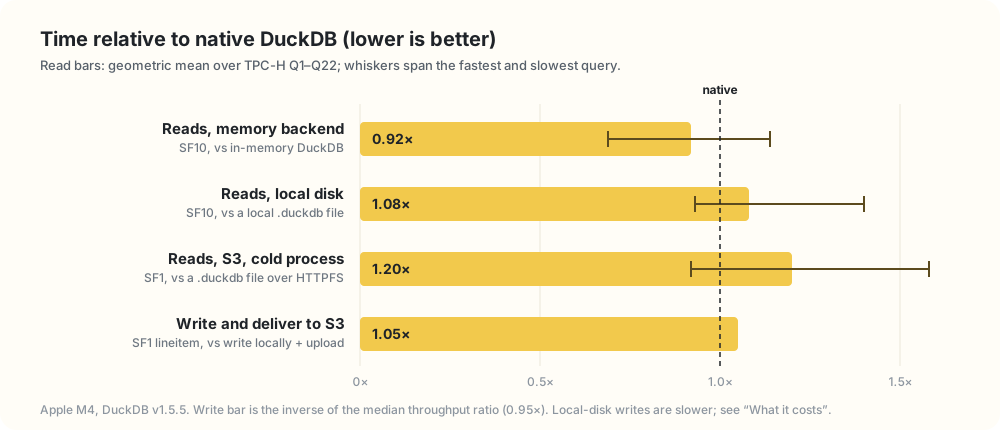
<p><img src="/assets/images/duckdb-object-storage/benchmark-summary.svg" alt="Bar chart of ObjFS time relative to native DuckDB: 0.92× for memory-backend reads, 1.08× for local-disk reads, 1.20× for cold S3 reads, and 1.05× for writing and delivering to S3." /></p>

<p>TPC-H Q1–Q22 on an Apple M4 with DuckDB v1.5.5:</p>

<ul>
  <li><strong>Memory backend, SF10: 0.92×</strong> native in-memory DuckDB. 20 of 22 queries were faster.</li>
  <li><strong>Local disk, SF10: 1.08×</strong> a native <code class="language-plaintext highlighter-rouge">.duckdb</code> file. The worst query, Q5, is 1.40×.</li>
  <li><strong>S3, SF1, cold process: 1.20×</strong> native DuckDB over HTTPFS, from 0.92× to 1.58×. Every query started a fresh process with empty caches; the client in Taipei read over the internet from a bucket in <code class="language-plaintext highlighter-rouge">ap-east-2</code>.</li>
  <li><strong>Writing to S3: 0.95×</strong> the throughput of writing locally and uploading with the AWS CLI, with no local copy or upload step.</li>
</ul>

<p>Per-query tables and the full method are in <a href="https://github.com/dentiny/duckdb-object-storage/blob/main/benchmark.md"><code class="language-plaintext highlighter-rouge">benchmark.md</code></a>.</p>

<h2 id="what-it-costs">What it costs</h2>

<ul>
  <li><strong>One writer per database.</strong> A second read-write attach isn’t rejected right away; fencing stops the first writer later.</li>
  <li><strong>Every commit is a round trip to the bucket</strong>, tens of milliseconds on S3 rather than a local SSD’s sub-millisecond fsync. Batch small writes.</li>
  <li><strong>Readers can lag by about ten seconds.</strong> Always consistent, not always current.</li>
  <li><strong>The writer does background work.</strong> SlateDB’s compaction and garbage collection use its CPU, memory and requests.</li>
  <li><strong>Local-disk writes run at 0.19× native.</strong> On S3 the gap disappears, because native DuckDB has to upload anyway.</li>
  <li><strong>Cold S3 reads are about 20% slower</strong> than native DuckDB over HTTPFS.</li>
  <li><strong>The bucket doesn’t hold a <code class="language-plaintext highlighter-rouge">.duckdb</code> file.</strong> It holds SlateDB objects, so stock DuckDB can’t open it. Move data in and out with <code class="language-plaintext highlighter-rouge">COPY FROM DATABASE</code>.</li>
  <li><strong>It’s DuckDB-only.</strong> If Spark and Trino need the tables, use Iceberg or DuckLake.</li>
  <li><strong>No directory listing yet</strong>, so globbing over <code class="language-plaintext highlighter-rouge">duckdb_objfs://</code> paths doesn’t work.</li>
  <li><strong>Settings are global per process</strong>, fixed at first use.</li>
</ul>

<h2 id="what-comes-next">What comes next</h2>

<h3 id="closing-the-performance-gap">Closing the performance gap</h3>

<p>Performance comes first: local writes at 0.19× and cold S3 reads at 1.2×, up to 1.58× on short queries. We’ll start by counting requests and bytes per query with <code class="language-plaintext highlighter-rouge">duckdb_objfs_io_stats()</code>, then:</p>

<ul>
  <li><strong>Fewer serial round trips on cold reads.</strong> A fresh process reads SlateDB’s manifest and SST indexes before any data, and on a high-latency link that adds up: Q16 gets about 200 ms slower on 370 ms. Loading metadata in parallel on attach should take most of it off the critical path.</li>
  <li><strong>Wider reads for large scans.</strong> More than today’s 4 concurrent fetches and 4 MiB read-ahead, with prefetching that follows DuckDB’s scan pattern.</li>
  <li><strong>Better persistent-cache defaults</strong>, so a restarted process isn’t completely cold.</li>
  <li><strong>Faster writes</strong>, mostly from the single WAL below, plus fewer chunk copies and SlateDB settings tuned for DuckDB.</li>
</ul>

<p>The goal: match HTTPFS on cold reads and native DuckDB on local writes.</p>

<h3 id="a-strong-consistency-mode">A strong consistency mode</h3>

<p>Bounded staleness is the right default for dashboards, but some workloads need read-after-write across processes: a job that commits and hands off to a reader, or a distributed query that must see the previous commit. An opt-in strong mode will refresh a read-only transaction to the writer’s latest manifest before it starts, at the cost of one round trip. Together with snapshot pinning, Duckherder can then ask for “the latest commit, and the same one on every worker.”</p>

<h3 id="one-write-ahead-log-not-two">One write-ahead log, not two</h3>

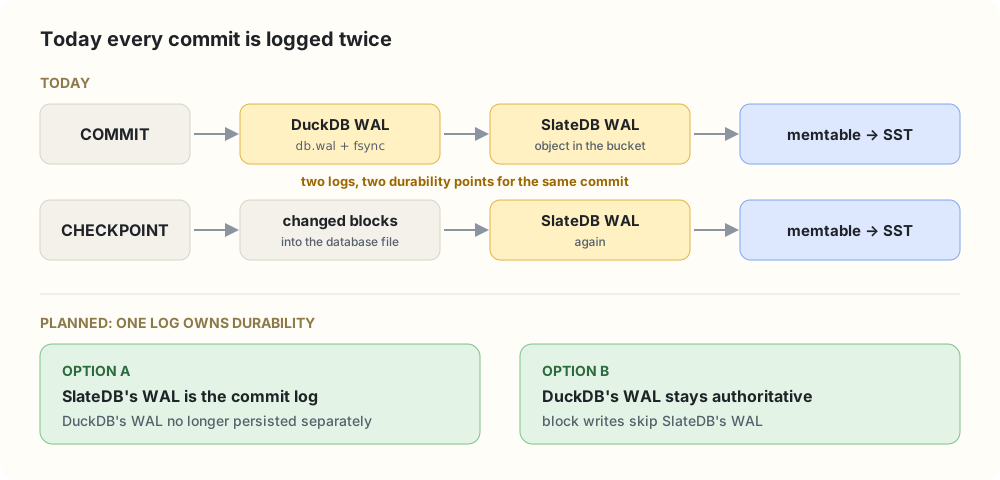
<p><img src="/assets/images/duckdb-object-storage/two-wals.svg" alt="Today a commit goes through DuckDB's WAL and then SlateDB's WAL, and a checkpoint goes through SlateDB's WAL again. The plan is for one log to own durability: either SlateDB's WAL is the commit log, or DuckDB's WAL stays authoritative and block writes skip SlateDB's WAL." /></p>

<p>To us, DuckDB’s WAL is just another file, so each commit is logged by DuckDB and then again by SlateDB, and pays for two durability points. That’s a likely part of the local write gap. We’ll redesign it so one log owns durability; most of the work is deciding which side owns it and how recovery replays it.</p>

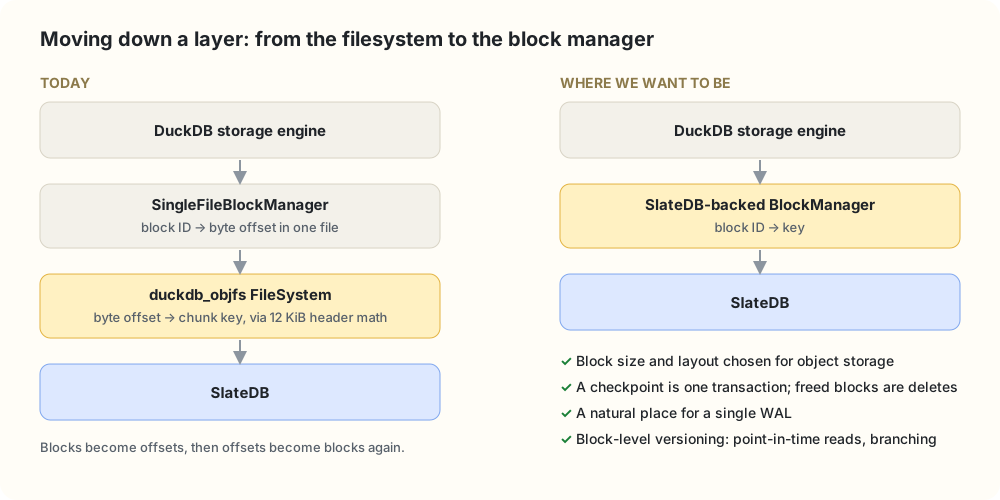
<h3 id="from-the-filesystem-to-the-block-manager">From the filesystem to the block manager</h3>

<p><img src="/assets/images/duckdb-object-storage/block-manager.svg" alt="Today: DuckDB's storage engine goes through SingleFileBlockManager, which turns blocks into byte offsets, and our filesystem turns offsets back into chunk keys. In the future, a SlateDB-backed block manager would map block IDs straight to keys." /></p>

<p>We plug in at the <code class="language-plaintext highlighter-rouge">FileSystem</code> layer because it let us store real databases from day one without touching DuckDB. The cost is that we see bytes and offsets, not blocks, so we work backwards from the file layout to get one key per block. DuckDB has a better seam one level up: the abstract <a href="https://github.com/duckdb/duckdb/blob/069cc9f9b5be802405797faecc284961b07c70ef/src/include/duckdb/storage/block_manager.hpp#L29-L101"><code class="language-plaintext highlighter-rouge">BlockManager</code></a>, whose on-disk implementation is <a href="https://github.com/duckdb/duckdb/blob/069cc9f9b5be802405797faecc284961b07c70ef/src/include/duckdb/storage/single_file_block_manager.hpp#L58-L61"><code class="language-plaintext highlighter-rouge">SingleFileBlockManager</code></a>.</p>

<p>The catch: DuckDB constructs <code class="language-plaintext highlighter-rouge">SingleFileBlockManager</code> directly in its storage manager (<a href="https://github.com/duckdb/duckdb/blob/069cc9f9b5be802405797faecc284961b07c70ef/src/storage/storage_manager.cpp#L439">here</a> and <a href="https://github.com/duckdb/duckdb/blob/069cc9f9b5be802405797faecc284961b07c70ef/src/storage/storage_manager.cpp#L467">here</a>), so an extension can’t supply its own yet. Getting there takes a storage extension with its own storage manager, or a small extension point upstream. The filesystem got us a working system first; the block manager is where we want to end up.</p>

<h3 id="also-on-the-list">Also on the list</h3>

<ul>
  <li><strong>Fail-fast writer exclusivity</strong>, rejecting a second read-write attach right away.</li>
  <li><strong>Snapshot pinning</strong>, so a query, or every worker in a distributed query, reads one named version.</li>
  <li><strong>A configurable manifest polling interval.</strong></li>
  <li><strong>Importing existing <code class="language-plaintext highlighter-rouge">.duckdb</code> files directly.</strong></li>
  <li><strong>Directory listing</strong>, so globbing works.</li>
  <li><strong>More backends through OpenDAL:</strong> GCS, Azure Blob Storage, HDFS.</li>
  <li><strong>Per-database configuration</strong>, so different <code class="language-plaintext highlighter-rouge">ATTACH</code> statements can use different buckets.</li>
</ul>

<h2 id="try-it">Try it</h2>

<p>Start DuckDB anywhere, attach a database from a bucket, and get the same database you’d have on a laptop, with nothing else to run.</p>

<div class="language-sql highlighter-rouge"><div class="highlight"><pre class="highlight"><code><span class="k">FORCE</span> <span class="n">INSTALL</span> <span class="n">duckdb_object_storage</span> <span class="k">FROM</span> <span class="n">community</span><span class="p">;</span>
<span class="k">LOAD</span> <span class="n">duckdb_object_storage</span><span class="p">;</span>
<span class="n">ATTACH</span> <span class="s1">'duckdb_objfs://hello.db'</span> <span class="k">AS</span> <span class="n">db</span><span class="p">;</span>   <span class="c1">-- after the S3 secret and settings from the first example</span>
</code></pre></div></div>

<p>Source, issues and benchmarks are on <a href="https://github.com/dentiny/duckdb-object-storage">GitHub</a>.</p>]]></content><author><name>dentiny</name></author><category term="DuckDB" /><category term="Object Storage" /><category term="SlateDB" /><summary type="html"><![CDATA[duckdb_object_storage stores native DuckDB databases (indexes, constraints, WAL and all) directly in object storage, with no table format, catalog database or fork of DuckDB.]]></summary></entry><entry><title type="html">Hello, world.</title><link href="https://dentiny.github.io/posts/hello-world/" rel="alternate" type="text/html" title="Hello, world." /><published>2026-10-05T00:00:00-07:00</published><updated>2026-10-05T00:00:00-07:00</updated><id>https://dentiny.github.io/posts/hello-world</id><content type="html" xml:base="https://dentiny.github.io/posts/hello-world/"><![CDATA[<p>Welcome to my blog.</p>

<p>This is a place for notes, ideas, and things I learn along the way. More soon.</p>]]></content><author><name>dentiny</name></author><category term="Notes" /><summary type="html"><![CDATA[A small beginning.]]></summary></entry></feed>