A Real DuckDB Database in S3, With Nothing Else to Run
duckdb_object_storage stores native DuckDB databases (indexes, constraints, WAL and all) directly in object storage. There’s no table format, no catalog database and no fork of DuckDB. You just need DuckDB and a bucket.
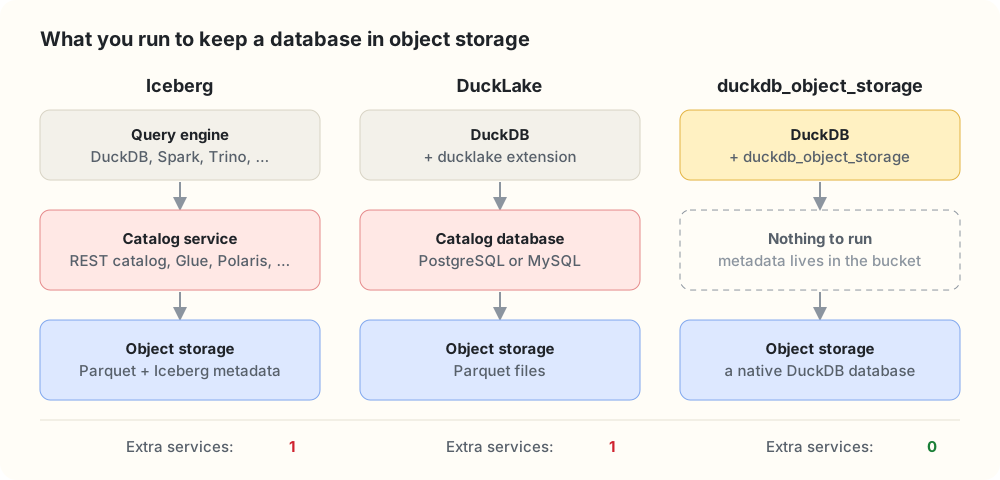
Every option stores data in object storage. The difference is what else you have to keep running next to it.
In brief
ATTACH 'duckdb_objfs://analytics.db'gives you an ordinary DuckDB database whose bytes live in S3. It’s a DuckDB community extension built on SlateDB and Apache OpenDAL.- Nothing to run but the bucket. No catalog service, no Postgres, no coordinator, no compactor. All metadata, even writer fencing, lives in object storage.
- Everything DuckDB does still works. ART indexes, enforced keys, the WAL, checkpoints,
COPYand extensions behave exactly as on a laptop, because we replaced the disk, not the database. - One writer, many readers, never inconsistent. Readers only ever see committed states. That makes it the storage layer for our distributed engine, Duckherder.
- Close to native speed. Reads are within about 10% of native DuckDB on local storage, and cold S3 reads are about 1.2× native DuckDB over HTTPFS.
- Tested with DuckDB’s own test suite.
DuckDB is a database in a file. That’s its charm, and it’s also the problem the moment a second machine shows up.
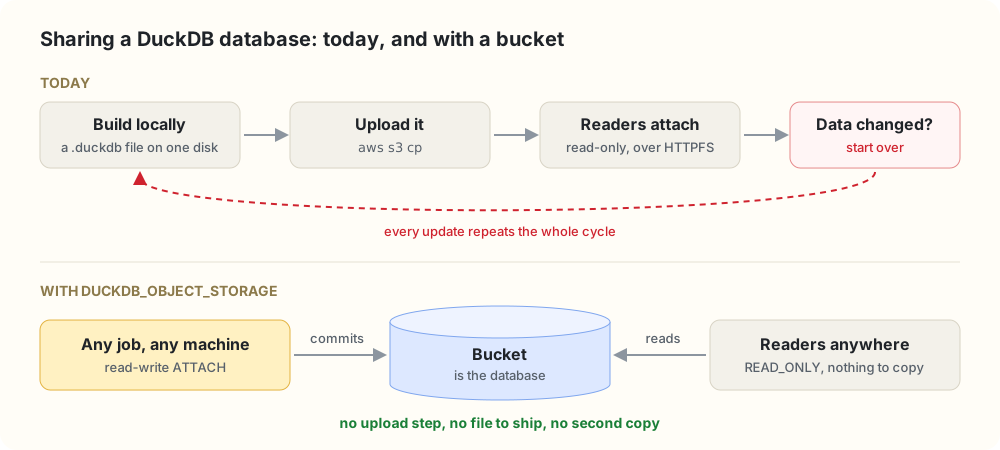
The rest of the data stack settled this years ago: object storage is the source of truth, and compute is disposable. We wanted DuckDB to work that way too, for ETL jobs on ephemeral compute, fleets of dashboards and services, and teams that want a database rather than a lakehouse, without DuckDB giving up being a database.
What it looks like
FORCE INSTALL duckdb_object_storage FROM community;
LOAD duckdb_object_storage;
LOAD httpfs;  -- provides the S3 secret type

-- Credentials come from DuckDB's Secret Manager, like any other S3 access.
CREATE SECRET (TYPE S3, PROVIDER credential_chain, REGION 'us-east-1', SCOPE 's3://my-bucket');

SET duckdb_objfs_backend = 's3';
SET duckdb_objfs_bucket  = 'my-bucket';

ATTACH 'duckdb_objfs://analytics.db' AS db;
USE db;

CREATE TABLE customers (
    id    BIGINT PRIMARY KEY,
    email VARCHAR UNIQUE NOT NULL
);
CREATE TABLE orders (
    id          BIGINT PRIMARY KEY,
    customer_id BIGINT REFERENCES customers(id),
    amount      DECIMAL(12, 2) CHECK (amount >= 0)
);
CREATE INDEX orders_by_customer ON orders(customer_id);

INSERT INTO customers VALUES (1, 'ada@example.com');
INSERT INTO orders VALUES (10, 1, 42.00);
CHECKPOINT db;

INSERT INTO orders VALUES (11, 99, 1.00);
-- Constraint Error: Violates foreign key constraint because key "id: 99"
-- does not exist in the referenced table
None of that SQL knows it’s talking to S3, and the constraints are enforced exactly as on local disk. On another machine, a second process can attach the same database read-only and query it right away:
ATTACH 'duckdb_objfs://analytics.db' AS db (READ_ONLY);
SELECT c.email, sum(o.amount) FROM db.orders o JOIN db.customers c ON o.customer_id = c.id GROUP BY ALL;
A table format is not a database
DuckDB can already read and write object storage through Iceberg and DuckLake, and we use both. But they solve a different problem: letting many engines share Parquet tables, at the price of a catalog and a narrower feature set. A table format gives you the features the format defines. A database gives you everything the database does.
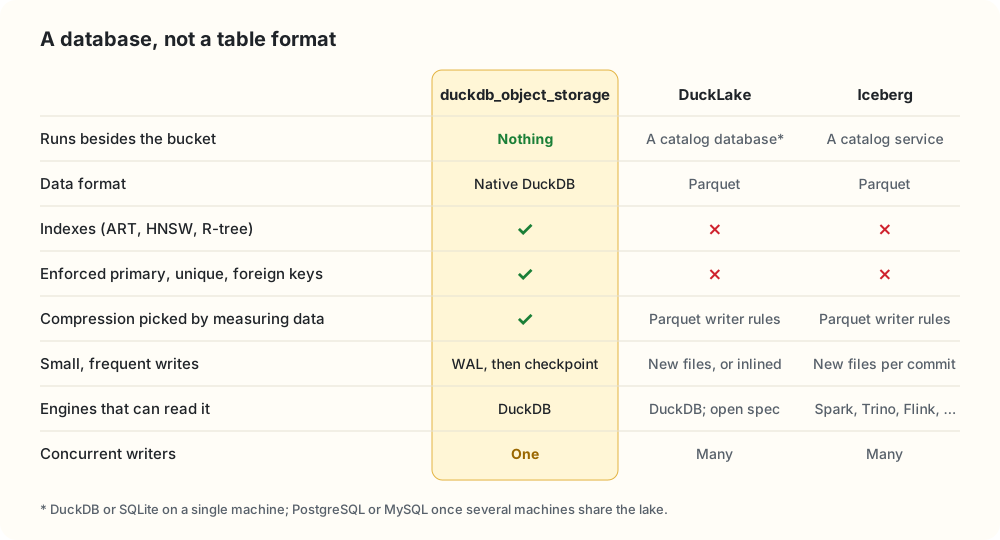
Storing DuckDB’s own format is what keeps the left column green:
- Indexes and constraints. ART indexes back primary keys, unique constraints and
CREATE INDEX.spatialkeeps R-trees andvsscan persist HNSW indexes (still experimental) in the same file. Parquet has nowhere to put them. - The whole catalog and type system. Views, macros, sequences, enums and every DuckDB type, with nothing mapped to Parquet.
- Cheap small writes. A one-row
UPDATEgoes into the WAL, and the next checkpoint folds it in. No new data file, no delete file, no compaction job. - Everything around the database.
COPY,EXPORT DATABASE,CHECKPOINT, and every extension that works on an attached database.
Compression that measures the data
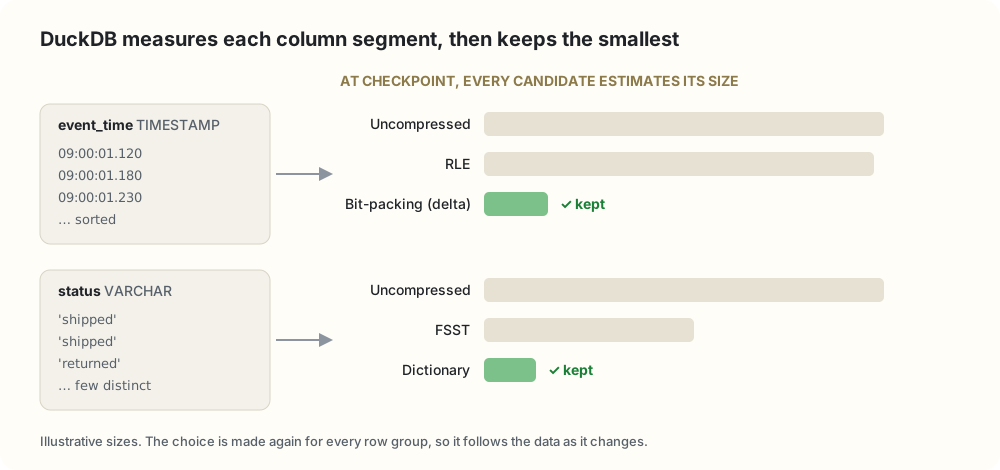
DuckDB compresses every column with lightweight codecs: constant, RLE, bit-packing, frame-of-reference, dictionary, FSST for strings and ALP for floating point. They’re cheap to decode, and constant and dictionary vectors can flow into the execution engine without being expanded first.
The codec isn’t picked by a fixed rule. At checkpoint, every candidate runs an analyze pass over the column segment and estimates its compressed size, and DuckDB keeps the smallest, again for every row group. Parquet has dictionary and RLE encodings too, but writers usually choose them by fixed rules and add Snappy or ZSTD on top, which every reader has to undo before it can scan. Because blocks reach us already compressed, we leave SlateDB’s own compression off.
And you don’t have to choose between the two worlds. One DuckDB session can attach a duckdb_objfs:// database, an Iceberg catalog and a DuckLake together, and join across all three.
The only thing to operate is a bucket.
Every extra service is something to provision, secure, back up, upgrade and page someone about. Here the bucket is the entire deployment. SlateDB keeps its manifest in the bucket and uses it to coordinate writers, so even writer fencing needs nothing else.
Replace the disk, not the database
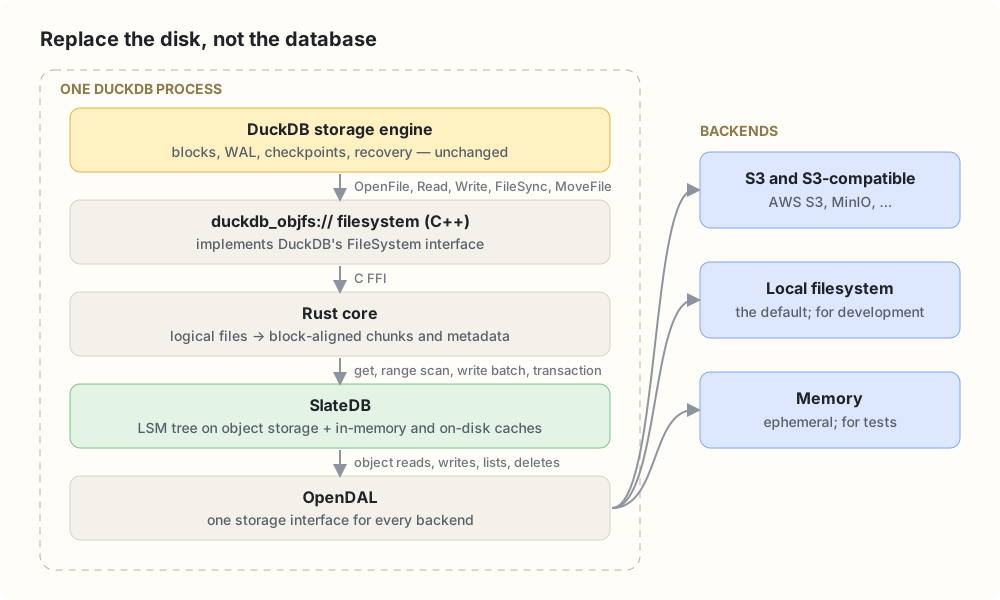
The extension registers a DuckDB FileSystem for the duckdb_objfs:// scheme. DuckDB’s storage engine opens, reads, writes, syncs, moves and removes files as it always does; it just happens to be talking to us. A thin C++ layer forwards each call over a C FFI to a Rust core, which maps files onto SlateDB.
We didn’t change DuckDB’s storage engine. We replaced the disk underneath it.
Everything else follows from that. DuckDB’s on-disk format is untouched, so every feature above comes along, and so will the storage features DuckDB adds in future releases.
Why not one object per file?
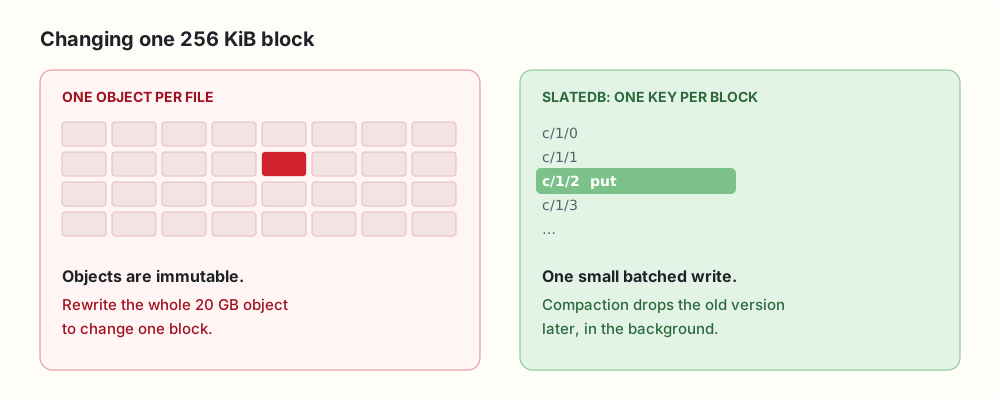
DuckDB updates its files in place. Objects are immutable. So we needed a storage engine built for exactly that mismatch, and SlateDB is one: an embedded LSM tree whose WAL, memtable flushes and SSTs all live in object storage. It gives us batched durable writes, atomic write batches, transactions, non-fencing readers and read caching. Its compaction and garbage collection run inside the writer process, so they don’t need a service either. (SlateDB and OpenDAL are Rust libraries, which is why the core is written in Rust.)
One code path for every backend: OpenDAL
SlateDB reaches storage through an adapter over an Apache OpenDAL Operator. Picking a backend just means building a different Operator: S3 (or MinIO), a local directory, or memory. Everything above it is the same code. OpenDAL also gives us layers, which is how duckdb_objfs_io_stats() records request counts, latency and bytes on any backend, and correct semantics per backend, such as atomic writes on the local filesystem. GCS, Azure Blob Storage and HDFS are mostly a feature flag away.
Every block is exactly one key
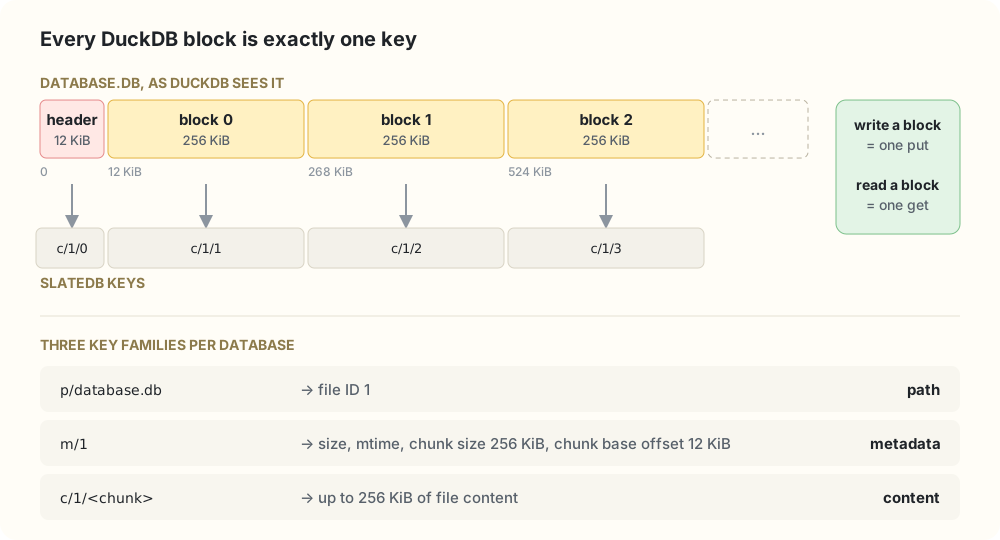
Each database gets its own SlateDB instance with a tiny filesystem inside: a path key maps a file name to an ID, a metadata key holds size and layout, and content lives in chunks under c/<file id>/<chunk index>. Fixed-width hex keeps a file’s chunks next to each other, so a byte range is one range scan.
The trick is the geometry. Chunks are 256 KiB, DuckDB’s block size, and they start after a 12 KiB offset, DuckDB’s header size. So every block lands on exactly one chunk: writing a block is one put, reading it is one get. Before we aligned them, every block straddled two chunks and every write was a read-modify-write of both.
fsync means durable in the bucket
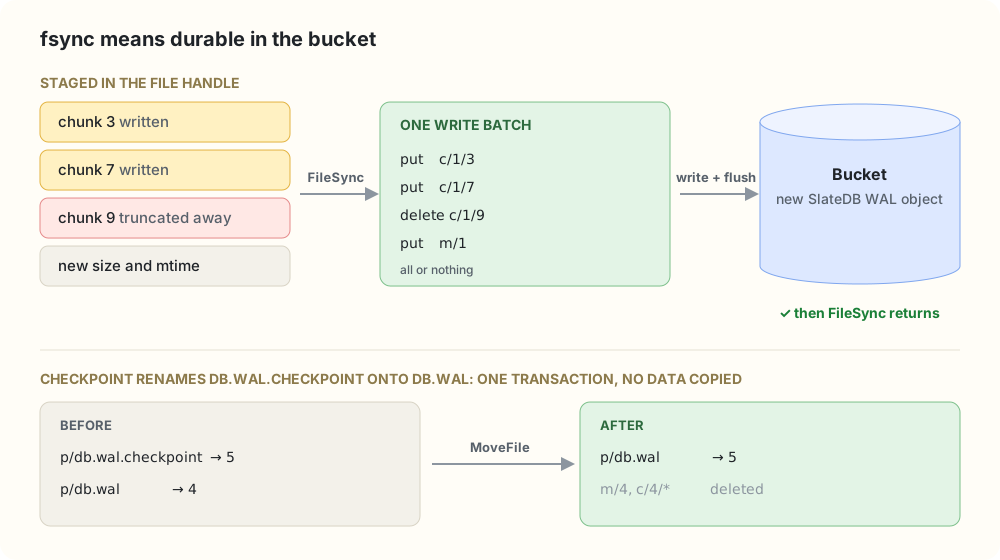
Writes are staged per file handle. On FileSync, DuckDB’s fsync, every dirty chunk, truncated chunk and the new metadata go into one write batch, which is flushed to object storage before the call returns. So DuckDB’s durability rules carry over unchanged, and no reader can see a file size the stored chunks don’t back. Renames are transactions too: the checkpoint’s db.wal.checkpoint → db.wal move just re-points a path key, with no data copied.
One writer, many readers
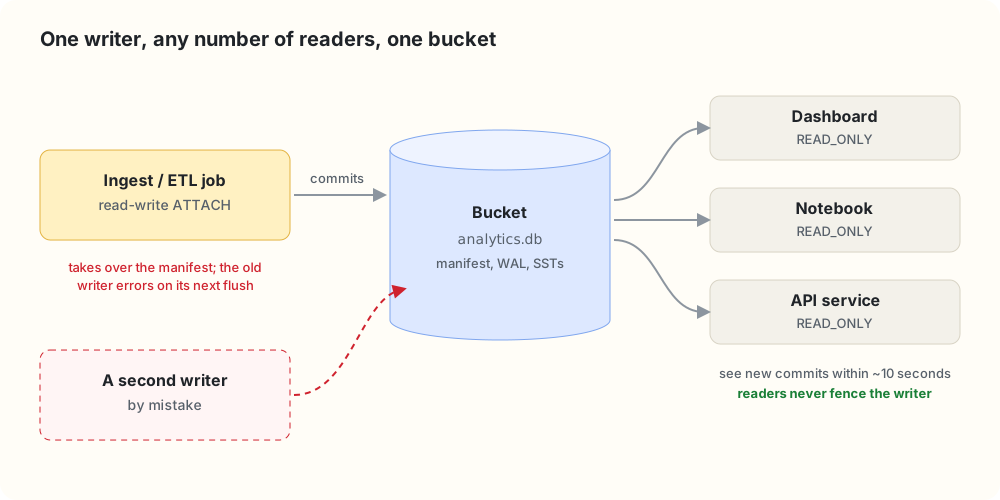
The writer opens SlateDB on the first read-write ATTACH, and its durable batches are the only way the database changes. Readers use SlateDB’s non-fencing reader, so attaching READ_ONLY from anywhere never disturbs the writer. A second writer by mistake is caught by manifest fencing: the newer one takes over, and the older one gets an I/O error instead of quietly diverging.
The principle behind it: a reader only ever sees a state the writer committed. It works from a checkpoint of the writer’s manifest and moves to a newer one as a whole, about every ten seconds. We tested exactly that:
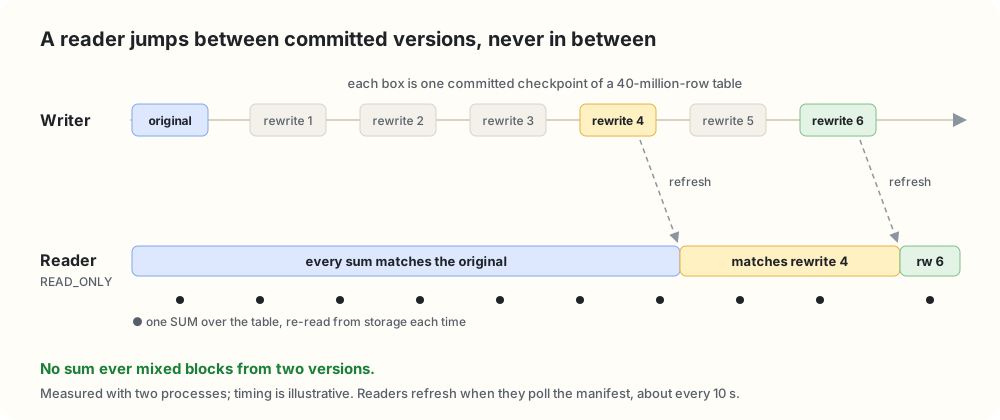
Readers can be a little behind. They are never inconsistent.
Fewer, larger, concurrent requests
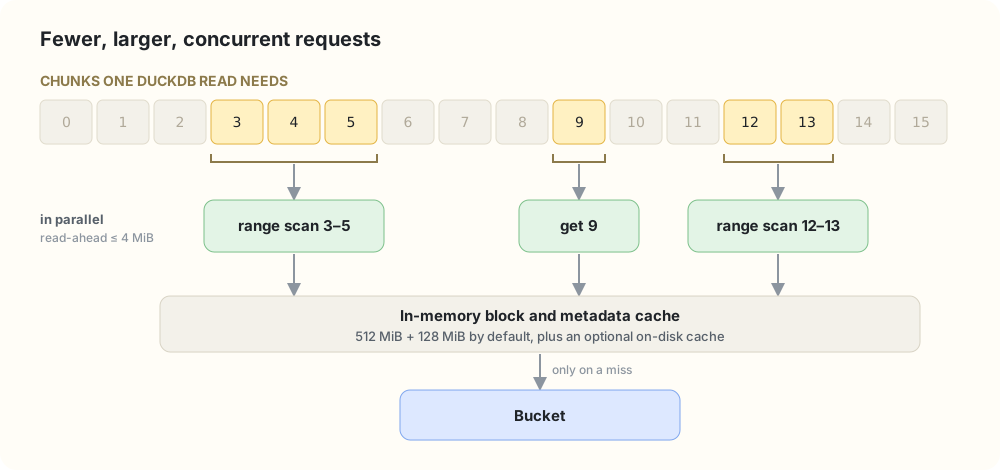
Object storage charges latency per request, so reads are grouped into contiguous runs of chunks, each fetched with one range scan (or one point lookup), all in parallel. Read-ahead follows the bytes actually requested, capped at 4 MiB. In front of the bucket sit a 512 MiB block cache and a 128 MiB metadata cache, plus an optional disk cache that survives restarts.
Fitting into DuckDB
- Credentials come from DuckDB’s Secret Manager, the standard
TYPE S3secret with scopes,credential_chain, MinIO endpoints and anonymous access. - Only durable files go to the bucket. Spill files stay on local disk, even if
temp_directorypoints atduckdb_objfs://. - Settings fail loudly. Changing backend or cache settings after first use is an error, not a silent no-op.
- You can see what it’s doing with
duckdb_objfs_cache_stats()andduckdb_objfs_io_stats().
The storage layer for distributed DuckDB
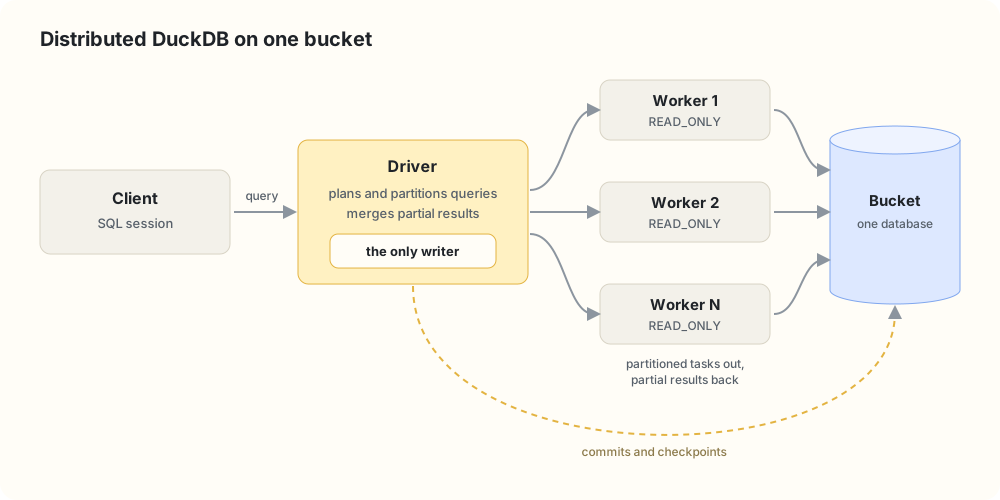
This extension is also the prerequisite for Duckherder, our distributed execution extension for DuckDB. A driver plans a query, sends partitioned tasks to workers over Arrow Flight, and merges the results. That needs every worker to read the same data without copying it, which is exactly the model above: the driver owns the only writer, every worker is a read-only attachment, and snapshot-consistent reads mean no worker ever computes over a half-written state. Adding a worker means starting another reader. No data to copy, no shards to rebalance.
Here’s what that looks like. The driver registers its workers, and a client attaches a database whose bytes live in the bucket:
-- On the driver: start the control node and register the workers.
SELECT duckherder_start_local_server(8815);
SELECT duckherder_register_worker('worker-1', 'grpc://10.0.0.11:8816');
SELECT duckherder_register_worker('worker-2', 'grpc://10.0.0.12:8816');
SELECT duckherder_register_worker('worker-3', 'grpc://10.0.0.13:8816');
SELECT duckherder_register_worker('worker-4', 'grpc://10.0.0.14:8816');

-- Write through the driver. The database is stored with duckdb_object_storage.
ATTACH 'localhost:8815/sales.db' AS dh (
    TYPE duckherder, DATA_PATH 's3://my-bucket/duckherder', SECRET 'my_s3'
);
CREATE TABLE dh.orders AS
    SELECT i AS id, 'region_' || (i % 4) AS region, (i % 1000)::DECIMAL(12, 2) AS amount
    FROM range(1000000) t(i);
DETACH dh;

-- Query it read-only.
ATTACH 'localhost:8815/sales.db' AS dh (
    TYPE duckherder, READ_ONLY, DATA_PATH 's3://my-bucket/duckherder', SECRET 'my_s3'
);
EXPLAIN SELECT region, sum(amount) FROM dh.orders GROUP BY region ORDER BY region;
The aggregation disappears from the local plan. Only the final ORDER BY stays on the client, and everything below it is a DISTRIBUTED_SCAN:
┌───────────────────────────┐
│          ORDER_BY         │
│ dh.main.orders.region ASC │
└─────────────┬─────────────┘
┌─────────────┴─────────────┐
│      DISTRIBUTED_SCAN     │
└───────────────────────────┘
After running the query, Duckherder’s execution stats show how it was split. The driver cut the table into row-group partitions, sent one task to each of the four workers, and each worker read its partition straight from the bucket. The driver then merged the partial GROUP BY results:
SELECT sql, execution_mode, merge_strategy, num_workers_used, num_tasks_generated
FROM duckherder_get_query_execution_stats() WHERE num_workers_used > 0;
┌────────────────────────────────────────────────────────┬─────────────────────┬────────────────┬──────────────────┬─────────────────────┐
│                          sql                           │   execution_mode    │ merge_strategy │ num_workers_used │ num_tasks_generated │
├────────────────────────────────────────────────────────┼─────────────────────┼────────────────┼──────────────────┼─────────────────────┤
│ SELECT region, sum(amount) FROM main.orders GROUP BY 1 │ ROW_GROUP_PARTITION │ GROUP_BY       │                4 │                   4 │
└────────────────────────────────────────────────────────┴─────────────────────┴────────────────┴──────────────────┴─────────────────────┘
Duckherder already distributes partial aggregation over a database stored this way. Next, each distributed query will be pinned to one committed snapshot, so every worker reads exactly the same version.
The test suite is the spec
It’s easy to say “everything works the same.” We wanted DuckDB to check that for us. So we run DuckDB’s own SQLLogicTest suite, thousands of test files, with every test redirected into an attached duckdb_objfs:// database. Tests that don’t pass must go into a skip list with a written reason:
- By design (about 45 tests). They assume the default catalog is called
memoryand fail the same way with any attached database, even a plain local file. - Unsupported (10 tests). They open a
.duckdbfixture that was never written throughduckdb_objfs://. - Extension bugs: none. Any new entry must link to a tracking issue.
A make target fails if a skipped test starts passing, so the lists can’t quietly go stale.
The numbers
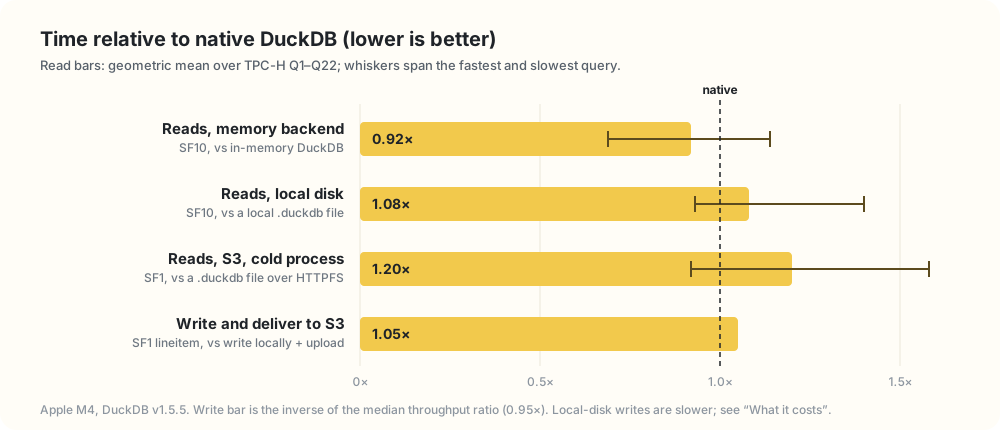
TPC-H Q1–Q22 on an Apple M4 with DuckDB v1.5.5:
- Memory backend, SF10: 0.92× native in-memory DuckDB. 20 of 22 queries were faster.
- Local disk, SF10: 1.08× a native
.duckdbfile. The worst query, Q5, is 1.40×. - S3, SF1, cold process: 1.20× native DuckDB over HTTPFS, from 0.92× to 1.58×. Every query started a fresh process with empty caches; the client in Taipei read over the internet from a bucket in
ap-east-2. - Writing to S3: 0.95× the throughput of writing locally and uploading with the AWS CLI, with no local copy or upload step.
Per-query tables and the full method are in benchmark.md.
What it costs
- One writer per database. A second read-write attach isn’t rejected right away; fencing stops the first writer later.
- Every commit is a round trip to the bucket, tens of milliseconds on S3 rather than a local SSD’s sub-millisecond fsync. Batch small writes.
- Readers can lag by about ten seconds. Always consistent, not always current.
- The writer does background work. SlateDB’s compaction and garbage collection use its CPU, memory and requests.
- Local-disk writes run at 0.19× native. On S3 the gap disappears, because native DuckDB has to upload anyway.
- Cold S3 reads are about 20% slower than native DuckDB over HTTPFS.
- The bucket doesn’t hold a
.duckdbfile. It holds SlateDB objects, so stock DuckDB can’t open it. Move data in and out withCOPY FROM DATABASE. - It’s DuckDB-only. If Spark and Trino need the tables, use Iceberg or DuckLake.
- No directory listing yet, so globbing over
duckdb_objfs://paths doesn’t work. - Settings are global per process, fixed at first use.
What comes next
Closing the performance gap
Performance comes first: local writes at 0.19× and cold S3 reads at 1.2×, up to 1.58× on short queries. We’ll start by counting requests and bytes per query with duckdb_objfs_io_stats(), then:
- Fewer serial round trips on cold reads. A fresh process reads SlateDB’s manifest and SST indexes before any data, and on a high-latency link that adds up: Q16 gets about 200 ms slower on 370 ms. Loading metadata in parallel on attach should take most of it off the critical path.
- Wider reads for large scans. More than today’s 4 concurrent fetches and 4 MiB read-ahead, with prefetching that follows DuckDB’s scan pattern.
- Better persistent-cache defaults, so a restarted process isn’t completely cold.
- Faster writes, mostly from the single WAL below, plus fewer chunk copies and SlateDB settings tuned for DuckDB.
The goal: match HTTPFS on cold reads and native DuckDB on local writes.
A strong consistency mode
Bounded staleness is the right default for dashboards, but some workloads need read-after-write across processes: a job that commits and hands off to a reader, or a distributed query that must see the previous commit. An opt-in strong mode will refresh a read-only transaction to the writer’s latest manifest before it starts, at the cost of one round trip. Together with snapshot pinning, Duckherder can then ask for “the latest commit, and the same one on every worker.”
One write-ahead log, not two
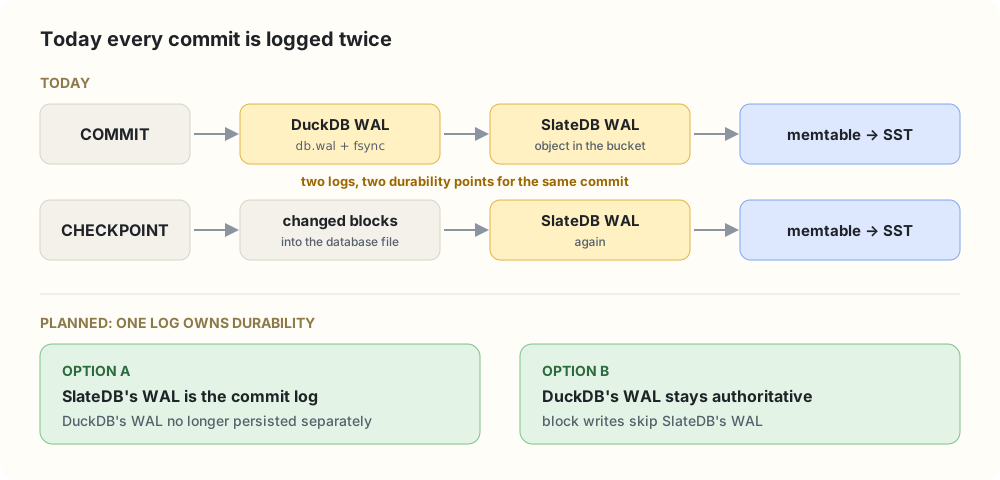
To us, DuckDB’s WAL is just another file, so each commit is logged by DuckDB and then again by SlateDB, and pays for two durability points. That’s a likely part of the local write gap. We’ll redesign it so one log owns durability; most of the work is deciding which side owns it and how recovery replays it.
From the filesystem to the block manager
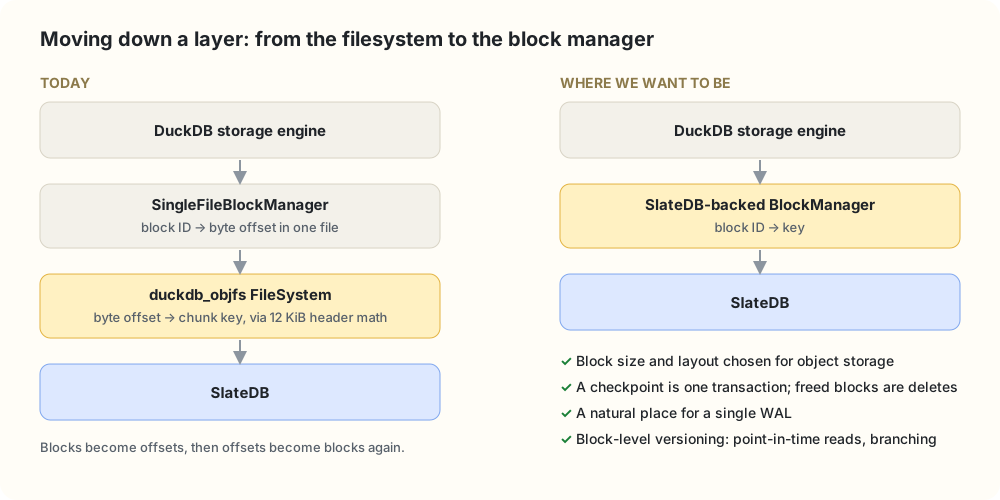
We plug in at the FileSystem layer because it let us store real databases from day one without touching DuckDB. The cost is that we see bytes and offsets, not blocks, so we work backwards from the file layout to get one key per block. DuckDB has a better seam one level up: the abstract BlockManager, whose on-disk implementation is SingleFileBlockManager.
The catch: DuckDB constructs SingleFileBlockManager directly in its storage manager (here and here), so an extension can’t supply its own yet. Getting there takes a storage extension with its own storage manager, or a small extension point upstream. The filesystem got us a working system first; the block manager is where we want to end up.
Also on the list
- Fail-fast writer exclusivity, rejecting a second read-write attach right away.
- Snapshot pinning, so a query, or every worker in a distributed query, reads one named version.
- A configurable manifest polling interval.
- Importing existing
.duckdbfiles directly. - Directory listing, so globbing works.
- More backends through OpenDAL: GCS, Azure Blob Storage, HDFS.
- Per-database configuration, so different
ATTACHstatements can use different buckets.
Try it
Start DuckDB anywhere, attach a database from a bucket, and get the same database you’d have on a laptop, with nothing else to run.
FORCE INSTALL duckdb_object_storage FROM community;
LOAD duckdb_object_storage;
ATTACH 'duckdb_objfs://hello.db' AS db;   -- after the S3 secret and settings from the first example
Source, issues and benchmarks are on GitHub.